

1. What a utility texture pack is 🔧
When most players hear texture pack, they think of a new look for blocks. But in the Bedrock community there is a whole category that cares more about function than beauty: utility texture packs, or texturas útiles as we call them in Spanish. These packs do not try to make Minecraft prettier. They make it more comfortable, more readable or more efficient. Some brighten dark caves, others make ores glow, others lower the fire on your screen so you can see while burning, and many improve the interface with useful information. Because they are still resource packs, they install like any texture pack and usually do not change the rules of the game, which is why they are so popular among survival players on Minecraft PE. In my video about 20 useful textures for Minecraft PE 26.x, embedded above, I tested many of them on a real phone. In this article I want to go deeper: explain how these packs work behind the scenes, which types are worth using, and where the line is between a helpful tool and an unfair advantage on servers. 📲
2. Why Bedrock packs can do so much 🧠
The reason utility packs are so powerful on Bedrock is the way the game is built. In Bedrock Edition, a resource pack can change much more than images. The user interface is described in data files using a system often called JSON UI, so a pack can move, add or remove elements of the HUD, the inventory or the menus. Packs can also change render settings for certain blocks, sounds, particles, models and even some lighting values. This flexibility is what lets creators build things like custom inventory layouts, extra information on screen or improved menus without touching the game rules. The trade-off is fragility. Because these packs modify internal files, a big game update can break them, especially UI packs, which is why a pack that worked perfectly on 26.30 might show a broken menu after 26.50. Experienced creators update their packs after each drop, and that is why I always recommend downloading the version that matches your game. Understanding this background helps you troubleshoot: if something breaks after an update, the first suspect is always the UI pack. ⚙️
3. Night vision and fullbright packs 🌙
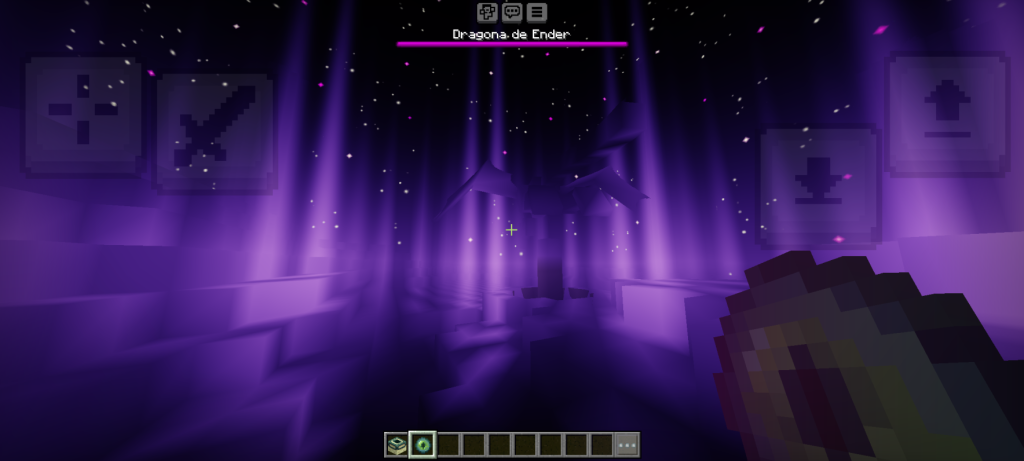
One of the most requested utility packs is infinite night vision, also known as fullbright. Normally, caves and nights in Minecraft are dark, and you need torches or a potion of night vision to see. A fullbright pack changes the way the game calculates brightness, so everything appears lit even without light sources. For building in caves, exploring at night or recording clear videos, this is incredibly useful, and my video about infinite night vision for Bedrock is one of the most viewed on my channel for a reason. However, it is important to understand what it does not change. Mobs still spawn in dark areas, because spawning depends on the real light level, not on what you see. So a cave that looks bright with fullbright can still spawn zombies and creepers around you. Many players get surprised by this. Use night vision packs as a visual help, but keep placing torches to make your base safe. On some servers fullbright is considered acceptable, on others it is not, so always read the rules before joining with it active. 🔦
🧠 Interactive concept map
🌙 Visibility
Fullbright and night vision. Mobs still spawn in real darkness.
💎 Mining
Glowing ores make deepslate ores easy to spot without seeing through walls.
⚔️ Combat
Low fire, short shields, clear water and lava, better particles.
📊 Interface
Durability numbers, cleaner hotbar, improved menus via JSON UI.
🏠 Building
Connected glass, better leaves, 3D items, block variations.
⚖️ Fair play
X-ray is cheating on servers. Always read server rules.
👆 Tap any branch to open it
4. Glowing ores and better mining 💎
Another favorite is the glowing ores pack, minerales brillantes. It makes diamonds, iron, gold, emeralds and other ores glow or shine with brighter outlines, so you can spot them easily in dark caves. Some versions also add animated sparkles. This pack is especially helpful after the 1.18 changes, because ores are now spread across deep deepslate layers where the stone is darker and harder to read. On a small phone screen, a glowing diamond is much easier to notice than a normal one. Technically, these packs work by changing the ore textures and, when the engine allows it, making parts of the texture appear brighter than the surroundings. On RenderDragon, Bedrock graphics engine, some lighting effects are limited without shaders, so the glow may look softer than on Java. Combined with a shader that supports emissive textures, the effect becomes stronger. Glowing ores do not reveal blocks through walls, which is the key difference from x-ray packs. You still need to explore and dig, but you stop missing ores that were right in front of you. It is a helpful pack that respects the spirit of survival. ⛏️
5. Low fire, clear views and combat helpers ⚔️
For players who enjoy combat or PvP, there are several small but very effective packs. Low fire lowers the flames that cover your screen when you are burning, so you can still see enemies and your surroundings. Short shields and small swords reduce how much of the screen your items occupy, which is useful on phones where space is limited. Clear water and clear lava packs improve visibility underwater or in the Nether, making exploration and rescue situations less frustrating. Some packs also improve particles, for example making critical hits clearer, or reduce visual clutter by removing excessive effects. These tweaks come from the competitive scene, where players have long looked for any visual clarity they could get. For normal survival they are simply quality of life improvements, and on most servers they are accepted because they do not show hidden information. If you play on a phone, these packs can make a real difference in fights against raids or in the trial chambers, where visibility matters a lot. Try them one by one to see which ones you really enjoy. 🛡️

6. Interface and information packs 📊
Some of the most useful packs improve the HUD and menus. Examples include packs that show item durability as numbers, show the amount of items in your inventory more clearly, reorganize the crafting screen or add a cleaner hotbar. There are also packs that improve the third person camera view, known in the community as the F5 view, or that modify the pause menu to show extra details. Bedrock has gradually added official options as well; for example, you can show coordinates on screen from the world settings, something players used to need a pack or a map item for. This is a nice example of how community ideas often end up in the base game. When choosing interface packs, quality matters. A poorly made UI pack can hide important buttons or break after an update, so download packs from known creators and check the version. Also avoid stacking several UI packs at the same time, because they often modify the same files and conflict with each other. One good interface pack is better than three that fight each other on your screen. 🧾
7. Building helpers and visual polish 🏠
Utility does not only mean survival. Builders also have their own favorites. Connected glass removes the borders between glass blocks so windows look like one clean surface, which makes modern builds look much better. Better leaves packs make trees look fuller and more natural. 3D item packs give depth to items in your hand. Some packs add subtle variations to blocks like grass or stone so large surfaces look less repetitive, a trick that makes landscapes feel more natural without changing the overall style. These packs sit between utility and aesthetics, and they combine well with lighter visual packs. Keep in mind that some building helpers use more complex models, which can cost performance on low-end phones, especially leaves packs in dense forests. As always, test them in a world similar to the one you play in. With the new blocks from Wilderness Bound, such as wool stairs, concrete slabs and cushions, builders have even more options in 2026, and well made helper packs make it easier to take advantage of them in your creations. 🧱
| Pack type | What it does | Survival value | On servers | Phone impact |
|---|---|---|---|---|
| Night vision | Lights up dark areas | High | Depends on rules | None |
| Glowing ores | Ores stand out | High | Usually allowed | Low |
| Low fire | Smaller flames on screen | Medium | Allowed | None |
| Short shields | More screen space | Medium | Allowed | None |
| UI packs | Extra info and layouts | Medium | Usually allowed | Low |
| Connected glass | Clean windows | Low | Allowed | Low |
| X-ray | See through blocks | Breaks the game | Forbidden | Low |
Tap a column header to sort ⇅
8. Fair play: x-ray and server rules ⚖️
We have to talk about the controversial side. Some texture packs make most blocks transparent so you can see ores and caves through walls; these are known as x-ray packs. In single player, using them is your choice, although it removes much of the challenge of mining. On servers and Realms with other people, x-ray is generally considered cheating, because it gives information other players do not have. Many servers use detection systems or forbid client packs entirely, and getting banned for x-ray is common. My personal recommendation is clear: use utility packs that improve comfort and readability, and avoid packs that reveal hidden information when you play with others. Night vision and glowing ores live in a gray area, so check the rules of each server. Respecting these rules is part of what keeps the Latin American Minecraft community healthy, especially on public survival servers where people invest weeks of work. A server owner also has the right to force a specific pack or disable custom packs, so do not take it personally if your favorite tools are blocked. 🚫

9. Organizing your pack stack 📚
When you use several utility packs together, organization is everything. In Global Resources, packs at the top override packs below. A good order is: interface packs at the top, then small utility packs like low fire or glowing ores, then your main texture pack, and finally shaders where their creators recommend. If two packs modify the same thing, only the higher one will apply, which explains why sometimes a pack seems to do nothing. Check the size of each pack too. Many utility packs are tiny, but some include high resolution textures that can slow down a low-end phone. Every time Minecraft updates, especially after big drops like Chaos Cubed or Wilderness Bound, disable UI packs first and see if the game works correctly, then reactivate them one by one. Keep a folder with the original files so you can reinstall quickly. Remember that resource packs do not disable achievements on Bedrock, so you can keep unlocking them while using utility textures, which is another reason these packs are so popular among survival players. 🗂️
10. Conclusion: comfort without losing the challenge 💚
Utility texture packs are one of the best things about playing Minecraft Bedrock. Thanks to the flexibility of resource packs and the JSON UI system, creators can improve visibility, interface and comfort without changing the rules of survival. Night vision helps you build in the dark, glowing ores make mining smarter, low fire and short shields make combat clearer, and building helpers make your creations shine. The key is balance: choose tools that make the game more comfortable while keeping the challenge that makes Minecraft fun, and respect server rules when you play with others. Always use versions updated for 26.x and organize your pack stack carefully to avoid conflicts after updates. If you want to see dozens of these packs tested on a phone, watch my video about the 20 useful textures embedded in this article, plus my night vision and glowing ores videos. I keep testing new ones every month on my channel PAU07, so tell me in the comments which utility pack you cannot play without anymore. Happy mining! ⛏️