

1. Why survival addons matter 🌍
Vanilla Minecraft survival is wonderful, but after hundreds of hours many players start to feel the same routine: chop trees, mine, build a base, repeat. Addons are the Bedrock answer to that feeling. They add new mechanics, tools and conveniences that make survival fresh again without turning it into a completely different game. On Java, players have used mods for years; on Minecraft PE and Bedrock, addons fill that role, and the Spanish-speaking community has embraced them more than almost anyone. My video about the 10 best survival addons for Minecraft PE 26.x, embedded above, is one of the longest I have recorded, because there is so much to show. In this article I want to go beyond the list and explain the background: how addons work, which types truly improve survival, how they interact with achievements, and how to build a modded world that stays stable after updates like 26.52. Whether you are a beginner or a veteran, understanding these ideas helps you pick addons that make your world better instead of chaotic. 🎮
2. A short history of Bedrock add-ons 📜
Add-ons first appeared in Pocket Edition around 2016, when Mojang introduced behavior packs and resource packs that could change how mobs act and look. At first they were limited: you could make a creeper behave like a pig or change a texture, but adding truly new content was hard. Over the years Mojang expanded the system step by step. Creators gained the ability to add custom entities, then custom items and blocks, then UI changes, and eventually a Script API that lets addons run JavaScript logic inside the game. That last step was huge, because it allowed complex systems like backpacks with real inventories, minimaps, security systems and smart mobs like Verity. Today Bedrock addons can do many things that once required full mods. The trade-off is that the system keeps evolving, so addons must be updated as Mojang changes APIs, which is why an addon from 2023 may not work in 2026. This history explains why version numbers matter so much in addon titles, and why I always specify the version, like 26.x, in my videos. 🧰
3. Dynamic lights: torches in your hand 🔦
One of the most loved survival addons is dynamic lights. In vanilla Minecraft, holding a torch does not light up anything around you; you must place it on a block. Dynamic lights addons change that, so a torch, lantern or glowing item in your hand illuminates the area as you walk. It sounds like a small detail, but it transforms cave exploration and night travel, making them more natural and less frustrating. Java players have enjoyed similar mods for years, and on Bedrock creators had to find clever ways to recreate the effect within addon limits, which is why some versions use invisible light blocks that follow the player. Because of that technique, quality varies between addons, and some can leave light behind or cost performance on low-end phones. In my video about the dynamic light addon for Bedrock, I show how it works with a torch in the second hand. A good dynamic lights addon is practically invisible: you only notice it because you suddenly stop placing torches every few steps. It is one of the first addons I recommend to anyone starting a modded survival. 🔥
🧠 Interactive concept map
📜 Origin
Behavior and resource packs since Pocket Edition 2016, now with Script API.
🔦 Dynamic lights
Torches light up in your hand. Great for caves and nights.
🗺️ Minimaps
Position, terrain and waypoints. Mind performance and server rules.
🎒 Backpacks
Portable storage. Test with unimportant items first.
🔎 WAILA
Shows what you are looking at. Works with other addons.
🏆 Achievements
Behavior packs and experiments can disable them. 26.52 fixed a Marketplace case.
👆 Tap any branch to open it
4. Minimaps and waypoints 🗺️
Getting lost is part of Minecraft, but after the tenth time you cannot find your base, it stops being fun. Minimap addons show a small map in the corner of your screen with your position, terrain and sometimes nearby mobs. Many include waypoints, so you can mark your base, a village or a mine and see the direction and distance on screen. On Bedrock, vanilla already offers coordinates as a world option and the classic map item, but a minimap is far more comfortable on a phone. The history of minimaps goes back to some of the most popular Java mods, and Bedrock creators have built versions using UI changes and the Script API. Keep in mind that minimaps calculate terrain constantly, so on low-end devices they can affect performance, especially with high render distances. Choose one that lets you adjust update frequency or size. Also check if the server you play on allows them, since some competitive servers consider radar features unfair. For single player and friends worlds, a minimap is one of the biggest quality of life improvements you can install. 🧭
5. Backpacks: inventory freedom 🎒
Inventory management is a constant struggle in survival. Backpack addons give you portable storage that you can carry, wear or place, with extra slots for resources. Some are simple, with one size, while others have tiers, upgrades, colors and even filters. Popular names in the community are inspired by Java mods like Traveler’s Backpack and Sophisticated Backpacks, and in my videos I have tested several Bedrock versions, including one I called the true best backpack addon. The challenge on Bedrock is technical: storing items safely inside an item requires careful scripting, and poorly made addons can lose items after updates. That is why I always recommend testing a backpack addon with unimportant items first and keeping it updated. Backpacks are especially useful for long expeditions, mining trips and exploring new biomes like the Dappled Forest from Wilderness Bound, where you collect a lot of new blocks. They also pair beautifully with the vanilla bundle, which Mojang added officially in recent years. With a good backpack, you can stay away from base much longer and enjoy exploring instead of constantly returning to empty your inventory. 📦
6. Info HUDs like WAILA 🔎
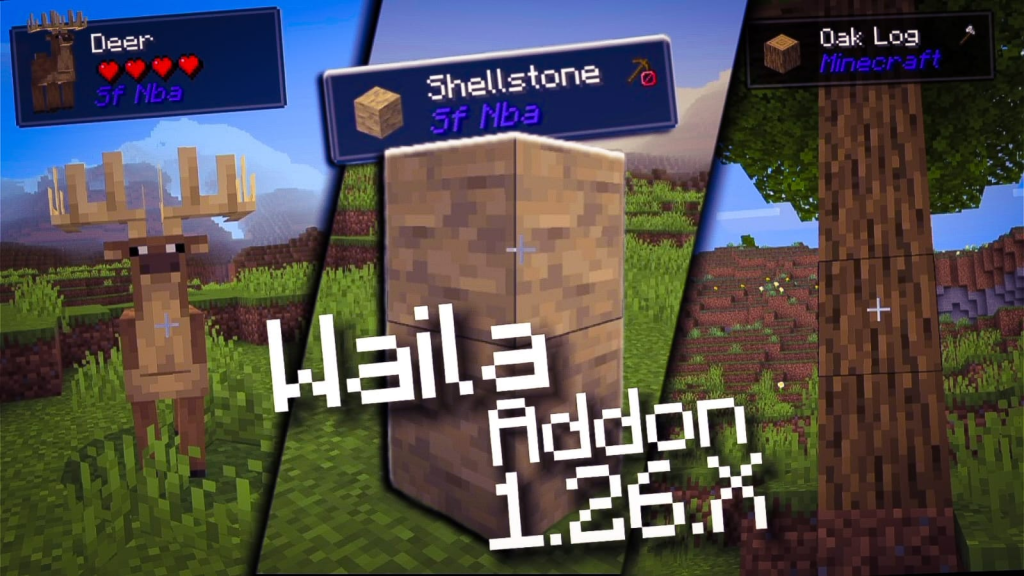
WAILA stands for What Am I Looking At, and it is one of the oldest ideas in Minecraft modding. The addon shows a small panel at the top of the screen with the name of the block or mob you are looking at, plus useful details like health, growth stage of crops or which tool is needed. This becomes essential when you play with many addons, because you will see new blocks and creatures you do not recognize. In my video about the WAILA addon for MCPE 26.x, I highlighted that it is compatible with any addons, which is exactly what makes it so useful in heavily modded worlds. Info HUDs are also great for beginners learning the game, since they explain what everything is without leaving the world. On phones, a clean HUD panel can even be easier to read than in-game descriptions. Some versions let you change position and size, which helps avoid covering important parts of the screen. If you plan to combine several addons in one survival world, WAILA should be one of the first you install, because it makes the rest easier to understand. 🧠
7. Guards and base defense 🛡️
Villages are full of value, but in vanilla they are fragile. Guard villagers addons add villagers equipped with weapons who patrol and defend against zombies, pillagers and other threats. They make villages feel alive and safe, and they turn raids into real battles where you fight alongside your allies. For players who build their base inside a village, guards are a game changer. On a bigger scale, addons like SecurityCraft bring cameras, keypads, reinforced blocks and defensive devices, perfect for servers and friends worlds where you want to protect your stuff. Defense addons connect to a long tradition in Minecraft of building protected bases, from simple walls to complex redstone traps. The background is simple: as worlds grow, so does the need to protect what you built. When choosing defense addons, think about balance. Very strong guards or turrets can make survival too easy if they handle every threat for you. Look for addons with settings or reasonable stats, so you still feel the danger of the night while enjoying a safer home. 🏰
| Addon type | Main benefit | Survival value | Phone impact | Tip |
|---|---|---|---|---|
| Dynamic lights | Light without placing torches | High | Low to medium | Pick a well optimized one |
| Minimap | Never get lost | High | Medium | Lower update rate on weak phones |
| Backpacks | More storage | High | Low | Test with spare items |
| WAILA | Identify blocks and mobs | Medium | Low | Essential in modded worlds |
| Guard villagers | Safer villages | Medium | Low | Keep the night challenging |
| Armor and gear | New progression goals | Medium | Low | Avoid overpowered sets |
Tap a column header to sort ⇅
8. Gear and armor expansions ⚔️
Another big category adds new armor, tools and weapons. Inspired by classic Java mods like Armor Plus, these addons give you new sets made from different materials, each with special abilities like extra speed, fire resistance or water breathing. They extend the progression path of survival, giving you new goals after you reach netherite. Some addons go further with realistic weapons, like the Radium's Armament addon I showed on my channel, which is more focused on action and zombie scenarios. The key with gear addons is how well they fit the vanilla balance. A good addon gives new options without making everything trivial. Armor that makes you immortal removes the challenge, while sets with interesting trade-offs add strategy. Also consider how they mix with vanilla mechanics like enchantments, trims and the mace added in recent years. Before installing, read the crafting recipes and see if the materials require exploration, because the most satisfying gear is the one you worked for. That sense of achievement is the heart of a good survival experience. 🗡️

9. Achievements, experiments and the 26.52 fix 🏆
Many players care about achievements, and addons can affect them. On Bedrock, activating behavior packs has traditionally disabled achievements in that world, while resource packs alone do not. Over the years Mojang has relaxed some cases, especially for official Marketplace content, and in 2026 the 26.52 hotfix fixed an issue where older worlds with activated Marketplace add-ons were disabling achievements after version 26.50. Community addons from outside the Marketplace usually still affect achievements, and some need experimental toggles enabled, which also disables them. That is why my video titled with addons that do not remove achievements was so popular: many players want both mods and trophies. If this matters to you, always read the addon description and check for experiments before activating it in your main world. A smart approach is to keep two worlds: a vanilla world for achievements and a modded world for fun. Also remember that achievements are tied to your Microsoft account, so they sync across devices once unlocked. Thinking about this before you start saves you from disappointment later. 🏅
10. Building a stable modded world ✅
Let me close with practical advice. Start with a small set of addons that solve real problems: lights, a map, a backpack and an info HUD. Add more only after confirming the first ones work together. Always download addons from trusted sources, because fake download pages and suspicious installers are common. Check that each addon says 26.x or newer, and after every big update, like Chaos Cubed or Wilderness Bound, back up your world before opening it again, since addons can break with new versions. Keep the order of behavior packs as the creator recommends. If the world crashes, disable the newest addon first. On low-end phones, avoid stacking many addons that run scripts constantly, as they can cause lag. Survival addons are about making the game more fun, not more stressful, so if an addon causes constant problems, remove it. Watch the three videos embedded in this article from my channel PAU07 to see each addon in action, and tell me in the comments which addon you cannot play without. Your suggestions decide what I test next! 💚