

- Version: Minecraft Bedrock Edition 26.60
- Release date: October 27, 2026
- Experimental content: Ice Caves, Ice Crystals, Icicles, Frostbite, Ice Ball and the Freezing effect (toggle “Drop 4 of 2026”)
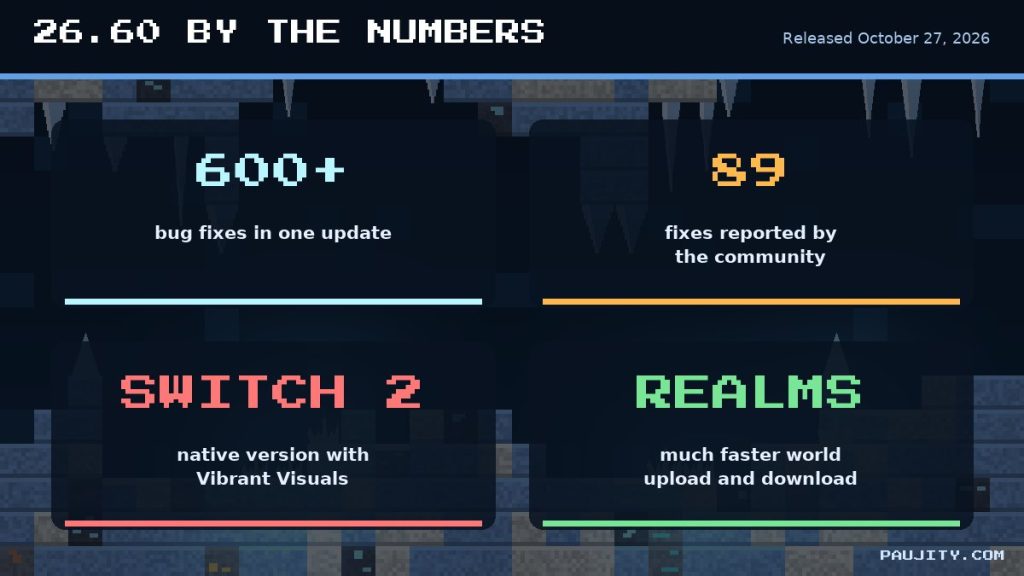
- Bug fixes: more than 600, with 89 reported by the community
- Platforms: Android, iOS, Windows, Xbox, PlayStation, Nintendo Switch and now Nintendo Switch 2
1. Minecraft Bedrock 26.60 is finally here ❄️
On October 27, 2026, Mojang released Minecraft: Bedrock Edition 26.60, and even though its biggest features are still experimental, it is one of the most interesting updates of the year. This version is the bridge between the cozy Wilderness Bound drop and the frozen adventure revealed at Minecraft LIVE in September: you can already explore the new Ice Caves, collect glowing Ice Crystals, dodge falling Icicles and fight the Frostbite, a brand-new zombie variant that freezes you with its attacks. At the same time, 26.60 is a massive quality update with more than 600 bug fixes, 89 of them reported by the community, plus a native version for Nintendo Switch 2 with Vibrant Visuals. In the video at the top of this article, recorded for my channel PAU07, I show the update running on Android, and in this written review I go through every important change in depth, using the official 26.60 changelog as the source: what is new, how each mechanic works, which fixes you will actually notice and what creators must know before updating their addons. Grab a warm jacket, because things are about to get very cold. 🧊
2. Experimental features: how to play the Ice Caves today 🧪
Before diving into the frozen content, it is important to understand that the Ice Caves, Ice Crystals, Icicles, the Frostbite, the Ice Ball and the Freezing effect are all experimental in 26.60. They belong to the fourth game drop of 2026, and Mojang ships them early so players can test them and send feedback before the final release. To try them, create a new world (or a copy of an existing one), open the world settings, go to the Experiments section and turn on the toggle called “Drop 4 of 2026”. Keep in mind that experimental features can change, break or even be removed before the drop becomes official, and that worlds with experiments enabled cannot earn achievements, so I strongly recommend a separate test world instead of your main survival save. Also remember that new biomes only generate in chunks that have never been loaded, so on a copy of an old world you must travel far away to find fresh terrain. Mojang collects opinions at feedback.minecraft.net and bug reports at bugs.mojang.com, and this testing phase is the perfect moment to make your voice heard. 🧪
3. The Ice Cave biome: a frozen world under the snow 🏔️
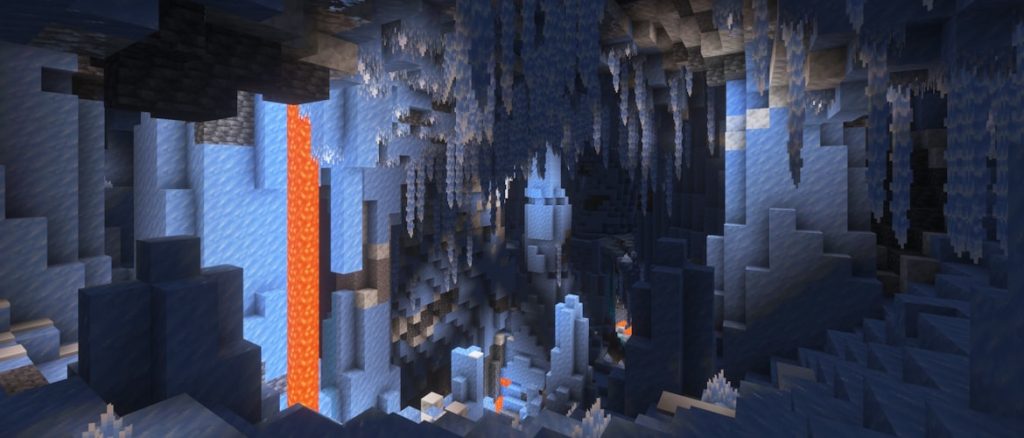
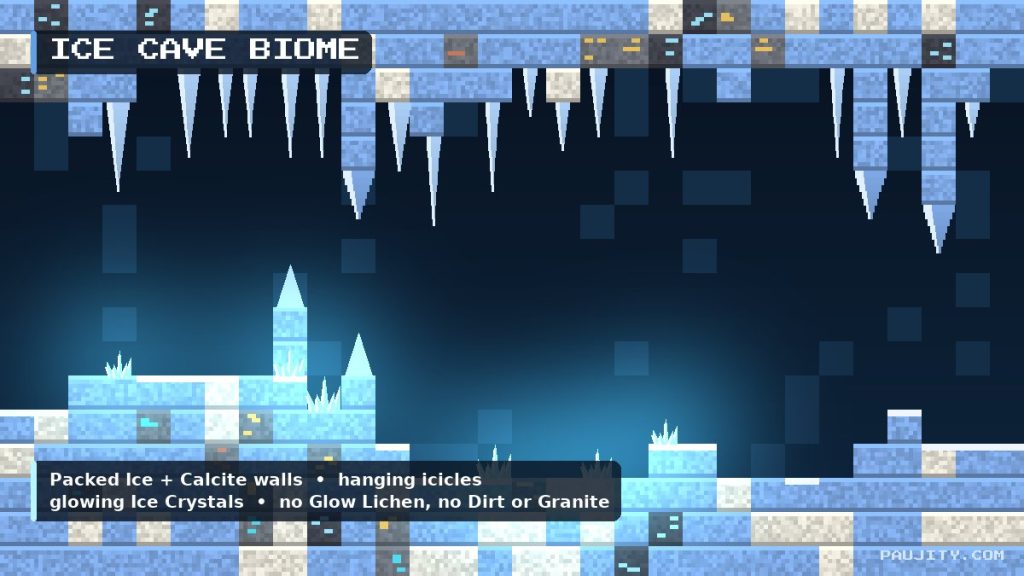
The star of this update is the Ice Cave, a new cave biome that generates underground below the coldest biomes of the Overworld. If you want to find one, look for snowy areas on the surface and explore the caves beneath them, because Ice Caves only appear under biomes with a low temperature. Inside, the terrain is made mostly of Packed Ice and Calcite, which gives these caves a bright blue-and-white look completely different from the gray stone tunnels we are used to. Icicles hang from the ceiling, large icicles made of Packed Ice grow both from the floor and from the roof, and small patches of Snow cover parts of the ground. Ores still exist here, embedded in pockets of Stone and Deepslate, so mining trips remain worth it. Some blocks are deliberately missing: Dirt, Granite and Glow Lichen do not generate in this biome, which makes the caves feel cleaner and much darker. Besides the usual cave mobs, Strays and Frostbites can spawn here, so Ice Caves are beautiful but definitely not peaceful. They join the family of special caves alongside Lush Caves, Dripstone Caves and Sulfur Caves. 🏔️
4. Ice Crystals: the only light in the dark 💎
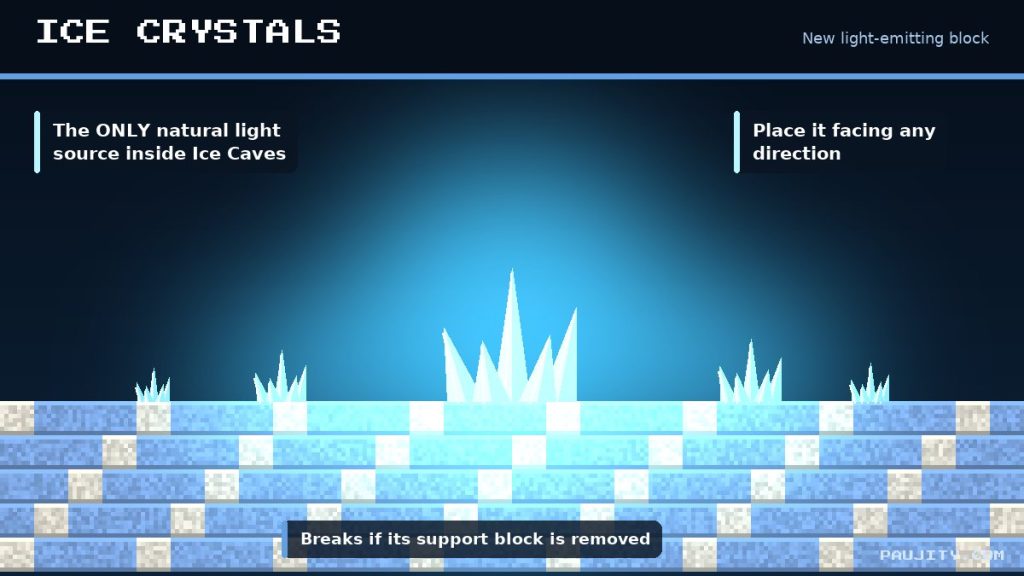
Because Glow Lichen does not generate in Ice Caves, Mojang needed another source of natural light, and the answer is the Ice Crystal. This new block works much like an Amethyst Cluster: it is a crystal-like decoration that naturally appears on top of Packed Ice blocks, it emits light and it can be placed facing any direction, so builders can attach it to floors, walls and ceilings. It is also fragile, because it breaks as soon as its support block is removed, exactly like the clusters we already know. In practice, Ice Crystals turn the caves into a gloomy landscape spotted with small cold lights, which looks fantastic with shaders and with Vibrant Visuals. Mojang lists one known issue in this version: the crystals are currently smaller than intended, so expect them to look bigger in a future preview or in the final release. For builders, Ice Crystals are an exciting new decorative light source: think of frozen castles, ice palaces, winter villages or magical lamps that do not look like torches or lanterns, and combine them with Packed Ice and Calcite for a perfectly themed build. 💎
5. Icicles: beautiful, dangerous and sensitive to light ⚠️
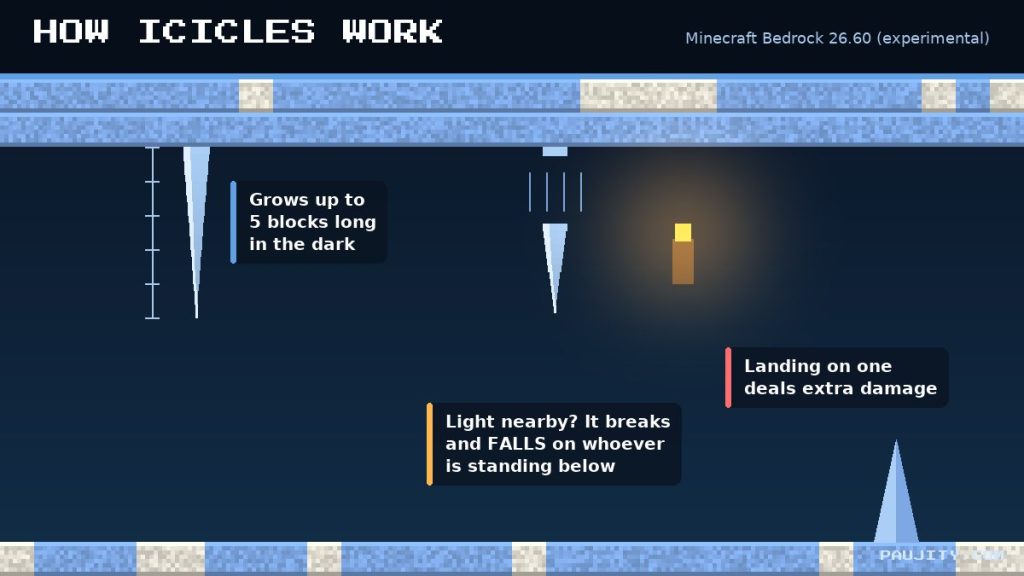
Icicles are the new hazard that every Ice Cave explorer must respect. They are a speleothem-style block, similar to Pointed Dripstone and Sulfur Spikes, that generates under Packed Ice on cave ceilings. When pointing downward they can naturally grow up to 5 blocks long, but only in dark areas outside the Nether with no light sources nearby. Here is the clever part: light makes them unstable. If the light level around an icicle becomes high enough, there is a chance it will break off and fall, damaging anyone or anything standing below, and icicles also deal extra damage to entities that land on top of them. They break when exposed to nearby light or when placed in the Nether, except for their base block. This creates a fun risk-and-reward system: placing torches makes the cave easier to see, but it can also trigger a rain of ice above your head. Smart players will be able to turn this mechanic into a trap, dropping icicles onto mobs with a well-placed light source, and I am sure we will see creative redstone contraptions built around it very soon. ⚠️
6. The new Freezing effect explained 🥶
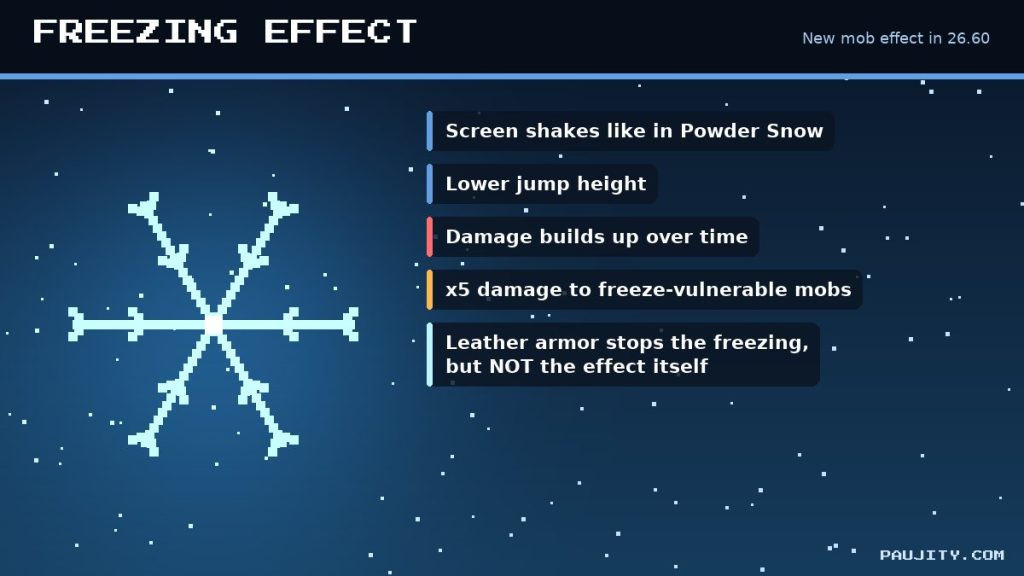
Bedrock 26.60 introduces a brand-new mob effect called Freezing. When it is applied, players start shaking, their jump height is reduced and, if the effect lasts long enough, they eventually take damage. In practice it works as if you were stuck inside Powder Snow for the whole duration of the effect, even when there is no snow around you. Leather Armor helps, just like it does with Powder Snow: wearing it keeps you from becoming frozen, but it does not stop the effect from being applied and it does not remove it, so the status icon will still be there. Mobs are affected too, and they take additional damage from freezing while they have the effect; creatures that are already vulnerable to freezing receive a five-times multiplier to that damage, which turns this effect into a powerful offensive tool. This is a big change for combat and PvP, because for the first time freezing is not tied to a specific block: it becomes something you can receive from enemies and, as we will see in the next sections, something you can throw at them as well. 🥶
7. Frostbite: the zombie that freezes you 🧟
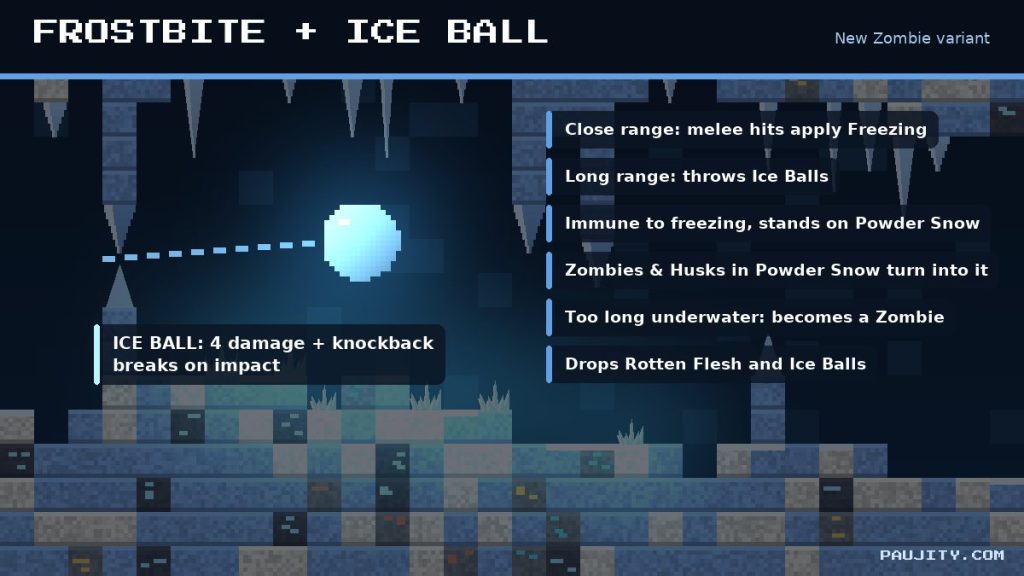
The Frostbite is the new hostile mob of this drop and a fresh Zombie variant that spawns in cold and icy biomes, including the Ice Caves. Its favorite tactic is to get close and attack in melee, because its hits apply the Freezing effect. However, it is smarter than a regular zombie: it switches between melee and ranged combat depending on how far away its target is and whether it is carrying Ice Balls, which it throws from a distance, and both adults and babies have dedicated throwing animations. The Frostbite is perfectly adapted to its environment: it can stand on top of Powder Snow, it is immune to freezing, and it is not slowed down by the Freezing effect or by Powder Snow. Transformations also play a role, because Zombies and Husks now turn into Frostbites when they stay inside Powder Snow, while a Frostbite that spends too long underwater becomes a normal Zombie. When defeated, it drops Rotten Flesh and Ice Balls, and those Ice Balls are the key ingredient for the new freezing items, which makes hunting Frostbites worth the risk. 🧟
8. Ice Balls, Potions of Freezing and Arrows of Freezing 🏹
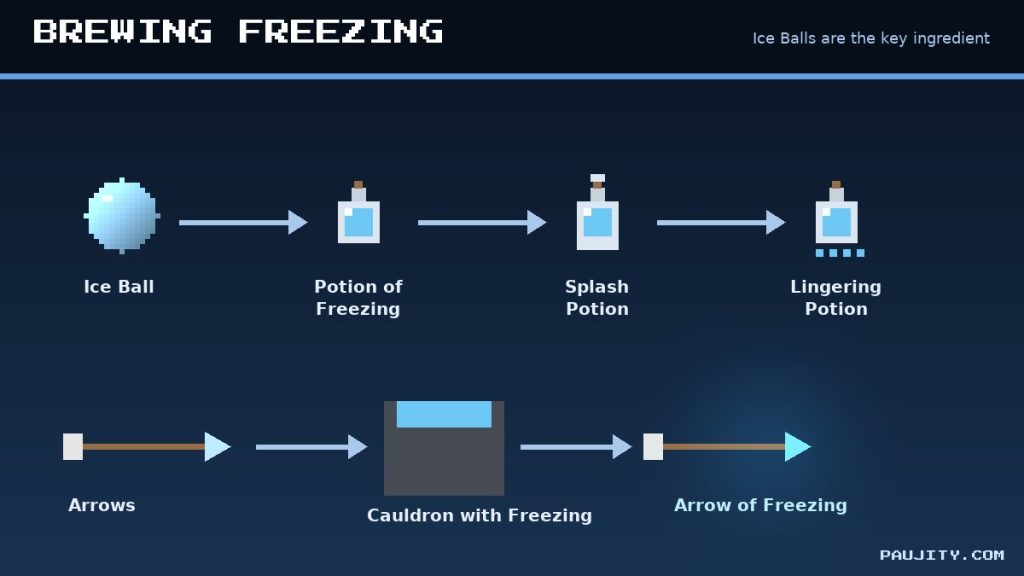
The Ice Ball is the Frostbite’s projectile of choice and the most important new item of this drop. When thrown, it deals 4 damage to the entity it hits, with the damage scaling down depending on its velocity, and it causes knockback before breaking on impact with a small particle effect and sound. Players can collect Ice Balls from defeated Frostbites, and their real value is in the brewing stand: Ice Balls are used to brew the Potion of Freezing, along with Splash and Lingering versions of it. To go one step further, you can fill a Cauldron with Potion of Freezing and dip Arrows into it to craft the Arrow of Freezing. This opens a whole new style of combat, because you can freeze enemies from a distance with a bow or crossbow, or throw a lingering cloud to control an area in a PvP arena. Combined with the five-times damage multiplier for freeze-vulnerable mobs, these items could become favorites for mob farms, minigames and servers once the drop leaves the experimental stage, and they give cold biomes a real reason to be visited. 🏹
9. Survival tips for your first Ice Cave expedition 🎒
Now that you know every new mechanic, here is how I recommend preparing for your first trip. First, wear Leather Armor, or at least some leather pieces, so the cold does not freeze you, even though the effect itself will still apply when a Frostbite hits you. Second, carry a shield and a bow, because Frostbites switch to throwing Ice Balls when you keep your distance, and blocking those projectiles saves a lot of health. Third, think before placing torches: lighting up an area under a ceiling full of icicles can make them fall, so light the floor away from them, or use that mechanic on purpose to drop ice on your enemies. Fourth, be careful with Powder Snow, since the Frostbite walks on it easily while you will sink unless you wear leather boots, so bring extra blocks to bridge over it. Finally, collect every Ice Ball you can, because they are your ticket to freezing potions and arrows, and mine Ice Crystals carefully since they break if you remove the block under them. Remember that Strays also spawn in this biome, and their Slowness arrows combined with Freezing can be deadly in a narrow tunnel. 🎒
10. More than 600 bug fixes: the real strength of 26.60 🛠️
Beyond the frozen content, 26.60 is one of the biggest polish updates in a long time. Mojang lists more than 600 bug fixes, and 89 of them were discovered thanks to players who reported them, which shows how valuable the community has become in the development process. These fixes touch almost every area of the game: blocks, commands, effects, gameplay, graphics, input, Marketplace, mobs, Realms, the interface, sound, stability and performance. For mobile players, who are most of my audience, several of them are very welcome: first inputs now appear correctly in the chat box on Android, visual stuttering with touch controls was fixed, the Android back button works again in Ore UI screens, and the Disclosure pop-up that could not be tapped on Android is fixed. Performance improved as well, with reduced stutter related to mobs and items across play sessions, a fix for crashes when loading worlds with huge connected structures of fences, glass panes, iron bars or walls, and protection against crashes caused by malformed resource archives. Fewer crashes and smoother gameplay matter just as much as new mobs, especially on mid-range phones. 🛠️
11. Minecraft arrives on Nintendo Switch 2 🎮
One of the headline announcements of this version is platform news: Minecraft is now available on Nintendo Switch 2, with support for Vibrant Visuals, the modern graphics mode that brings improved lighting, shadows and atmosphere without installing shaders. Several fixes in the changelog are dedicated to Nintendo hardware, including better split-screen performance on Switch 2, more stable network connections on Switch, a fix for UI elements appearing in world preview images when using Vibrant Visuals, and a fix for wireless controllers that stopped responding on the world selection screen after leaving a world. Realms also received attention on Nintendo consoles: the Realms free trial is now available on Nintendo Switch, so new players can test a personal server with friends before paying, and large worlds can now be duplicated on Switch when there is enough storage. For the whole community this is great news, because a stronger Switch version means more players joining crossplay worlds with friends on Android, iOS, Windows, Xbox and PlayStation, and more people discovering Bedrock for the first time. 🎮
12. Gameplay changes you will notice right away ⚔️
Several gameplay fixes change how the game feels day to day. Players now take fall damage when landing on a solid block at the edge of a water block, closing a well-known way of avoiding damage. Villagers no longer become unresponsive when you interact with them while opening your inventory, Bundles placed in a Double Chest no longer lose their contents randomly, and grown-up baby Horses can no longer squeeze through corridors two blocks high and one block wide. You also stop being forced out of sneaking when you touch water. In combat, Regeneration from Axolotls can no longer be stacked infinitely, a Wind Burst Mace no longer launches you into the air when hitting Boats, Minecarts or Cushions, and untipped Arrows no longer bounce off entities when their damage is fully absorbed. Effects behave better too: a weaker effect with a longer duration now correctly resumes after a stronger, shorter effect of the same type ends, and the HUD displays it properly. Finally, Shulkers can now be pushed by Pistons just like in Java Edition, and Strider riders dismount onto a safe block in the direction they are looking instead of into the lava. ⚔️
13. Explorer Maps renamed and snappable Trapdoors 🗺️
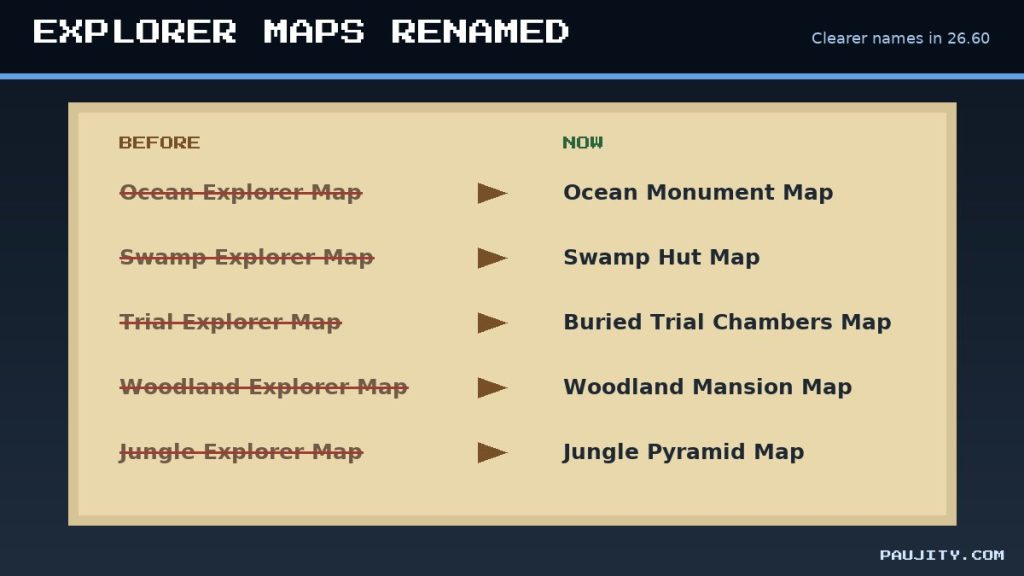
Some of the most practical changes are about clarity and building comfort. The Explorer Maps have been renamed to be more consistent and easier to understand: the Ocean Explorer Map is now the Ocean Monument Map, the Swamp Explorer Map is the Swamp Hut Map, the Trial Explorer Map becomes the Buried Trial Chambers Map, the Woodland Explorer Map is now the Woodland Mansion Map and the Jungle Explorer Map is renamed to Jungle Pyramid Map. Now you know exactly where each map will take you before you trade for it. Builders also get a very useful quality-of-life feature: Trapdoors now have snappable placement, which means that if you hold the place control while a Trapdoor is selected, every Trapdoor you place keeps the same fixed direction until you release the control. This makes long rows of trapdoors for walls, roofs and detailed facades much faster, especially on touch screens where precise aiming is difficult. Red and Brown Mushrooms also became more flexible: they can now be placed on any block with a solid top face regardless of light, although they still only spread in low light or on blocks like Mycelium. 🗺️
14. Blocks, redstone and world generation fixes 🧱
Redstone engineers and builders have plenty of fixes to celebrate. Wool and Concrete blocks now produce the correct instrument sounds with Note Blocks, Snow now produces vibrations when placed so Sculk Sensors can detect it, and Redstone dust renders correctly when it climbs the side of a block while also stepping down on the opposite side. Redstone also connects visually to custom blocks that produce power, and blocks replaced with /fill or /setblock now keep correct redstone behavior, including Pistons that no longer get their arms stuck in neighboring blocks. The Wilderness Bound content received polish as well: Cushions in unloaded chunks no longer disappear when the chunk reloads, players sit two pixels lower on them, Straw Beds can no longer be placed on blocks occupied by an entity, and the camera height while sleeping in a Straw Bed was fixed. Abandoned Camps no longer include a stray Mycelium block in swamps or single Coarse Dirt blocks. In world generation, Lush Caves now appear instead of Dripstone Caves or Sulfur Caves in very humid regions, which should make that colorful biome easier to find. 🧱
15. Graphics, Vibrant Visuals and performance ✨
Visual quality keeps improving with each version, and 26.60 continues that trend. Instability when Block Light Quality is set to Volumetric Lights was fixed on PS4 and Android, aliasing artifacts on Beds and Signs with colored block lighting are gone, and the game now shows a warning when you go above the recommended render distance for Vibrant Visuals. Distance fog is no longer overly bright in front of water, resource packs and the fog command once again control fog distance when the Ender Dragon is dead or far away, and the sky now fades in properly when Night Vision and Blindness are active together. The End flash in Fancy graphics is now closer to Java Edition, and Character Creator layers like outerwear, socks and belts are finally hidden under equipped armor. Players using ray tracing will see the correct texture on Minecarts with Hoppers, automatic upscaling now picks the closest supported resolution when switching to Custom graphics, and the block selection outline appears even when a mob is standing on the block. If you love shaders, these fixes are a great base for the next generation of packs. ✨
16. Mobs, sounds and accessibility improvements 🔊
Mob behavior and presentation also got attention. The Drowned model now more closely matches Java Edition and helmets equipped by Drowned are finally visible, Sheep no longer get stuck in their grazing animation, split Slimes no longer inherit their parent’s properties, and a rare bug where healing a mob could kill it was fixed. Armor Stands now reject invalid equipment swaps and exchange items directly with the player, and tamed baby mobs can now be healed by feeding them. Sound fans will notice that the Ice block has custom sounds, and that audio no longer goes out of sync after pausing and resuming the game. Accessibility received a long list of improvements: dozens of closed captions were added or corrected, including fish, Elder Guardians, Slimes, Creepers, Dispensers and thrown items, while baby Turtles and baby Polar Bears now have their own captions. Screen narration improved across Realms screens, progress bars meet the minimum contrast ratio, Extra Large UI returns to the default scale when disabled, and many toggles and sliders now have proper narration labels. These changes make Minecraft friendlier for every type of player. 🔊
17. Realms: faster uploads and easier invites ☁️
If you play on Realms, 26.60 is a meaningful upgrade. Mojang made major improvements to the speed and reliability of world uploads and downloads, one of the most common complaints from owners who move big worlds between devices. The Realms Hub changed a lot as well: the Members screens were rebuilt with OreUI and new functionality, adding members with search is faster, and you can now invite players without first making them your Xbox friend, removing an annoying extra step. The Members screen also shows recommended friends, the World tab lists the packs applied to each world, and a new Learn more subtab inside Settings works as a help guide for Realm owners and admins. Hardcore worlds are now correctly identified in Realm world slots, and the active world size is displayed consistently. Combined with deep links that open a specific Realm and the free trial on Nintendo Switch, these changes make it easier than ever to start a shared world with your friends and keep it running smoothly, whether you play on a phone, a console or a PC. ☁️
18. User interface, fonts and Marketplace 📱
The user interface also evolved in this version. Minecraft’s bitmap font now includes extended Latin, Cyrillic and Greek characters, and the character size grew to 8 by 12 pixels, so languages that use these characters no longer show a mix of fonts in the menus. This should be especially nice for Spanish and Portuguese players, whose accented letters can now match the rest of the pixel text. Chinese, Japanese and Korean text is better aligned in chat, books and signs, and Vietnamese and Lao marks render correctly. Other improvements include faster loading of Ore UI screens, a scrollable report player panel, clearer error messages when joining Featured and Creator Experiences, and a Command Block screen that no longer censors partially typed words. Resource pack lovers will appreciate that the pack list now scrolls while you drag a pack, and that focus follows the pack to its new position. On the Marketplace, imported custom skins no longer reset after relaunching the game, the Wishlist updates instantly, a new Audio category was added, and the Gift button no longer appears on free or default content. 📱
19. What changes for addon creators and developers 🧩
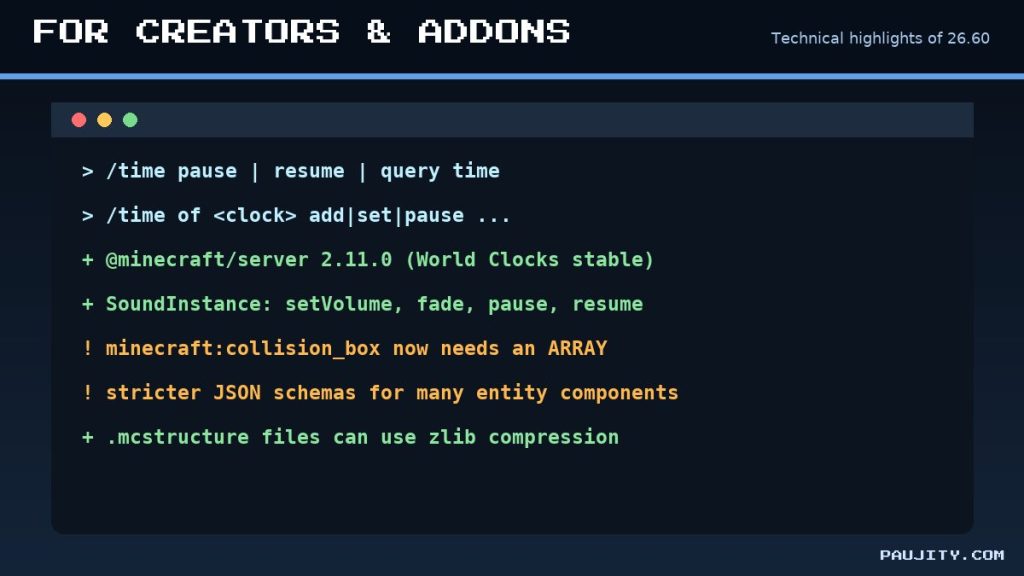
For addon makers and map creators, 26.60 brings important technical news. The World Clocks system left its experiment: commands like /time pause, /time resume and /time query time now work without experiments, and the new /time of subcommand lets you add, set, pause and resume custom world clocks. The Script API advanced to @minecraft/server 2.11.0, releasing World Clocks, Dimension.spawnXp, tamed-owner properties and SoundInstance controls like setVolume, fade, pause and resume, while @minecraft/server-ui 2.3.0 adds tooltips and button icons to custom forms. At the same time, many entity components and AI goals received stricter schemas for format version 1.26.60 and newer, and minecraft:collision_box now only accepts arrays instead of a single box object. The minecraft:trail component gained new fields, loot tables can keep applying functions after a count of zero, and .mcstructure files can use zlib compression. If you update a pack to the new format version, review your JSON carefully, because invalid data will make entities fail to load. As players, keep an eye on updates for your favorite addons, like my The Sift Dimension add-on, before testing them on 26.60. 🧩
20. Final verdict and how to update to 26.60 💚
Minecraft Bedrock 26.60 is a smart update: it gives players a first taste of the winter drop with Ice Caves, Ice Crystals, Icicles, the Frostbite and the Freezing effect, while fixing more than 600 bugs that make the everyday experience smoother on every platform. The experimental content already feels full of personality, especially the relationship between light and icicles and the new freezing combat, and I believe it will be one of the most loved drops of the year once it becomes official; if you want to see how it fits into the bigger picture, read my Minecraft 2026 timeline. To update, open Google Play on Android, the App Store on iPhone and iPad, the Minecraft Launcher on Windows, or your console store, and download the latest version. Before updating, back up your important worlds, and if you use addons, shaders or UI packs, confirm that they support 26.60. If you want the official game, use the download button below, which takes you straight to Mojang’s website. And do not forget to watch my review on PAU07, leave a comment with your favorite feature and subscribe for more Minecraft news. See you in the Ice Caves! 💚
- Atmospheric Ice Caves with a unique light-versus-icicle mechanic
- Freezing combat with potions and arrows
- More than 600 bug fixes and smoother touch controls
- Native Nintendo Switch 2 version with Vibrant Visuals
- The frozen content is still experimental
- Experimental worlds cannot earn achievements
- Ice Crystals are smaller than intended for now
- Addons updated to 1.26.60 face stricter JSON rules