

- Version: Minecraft Beta & Preview 26.70.23 (Bedrock Edition)
- Release date: November 3, 2026
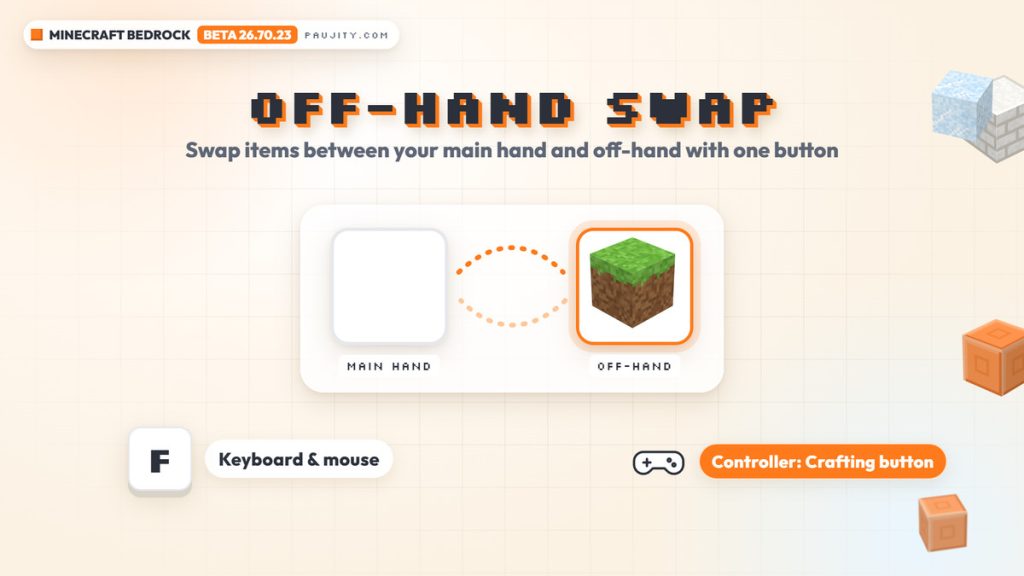
- Headline feature: swap items between your main hand and off-hand (F on keyboard, Crafting button on controller)
- Drop 4 of 2026 features: calcite blocksets, the “flurry” music disc by Hyper Potions and Packed Ice improvements
- Where to play: Beta on Android (Google Play) and Preview on Xbox, PlayStation, Windows and iOS
- Status: work-in-progress build that can be unstable
1. Minecraft Beta 26.70.23 is here: the off-hand swap finally arrives 🤚
Minecraft: Bedrock Edition is finally getting a quick way to use your off-hand. Mojang released Minecraft Beta & Preview 26.70.23 on November 3, 2026, and the change that stands out the most is the new off-hand swap: with a single button you can move an available item from your main hand to your off-hand and back again. Until now, managing the off-hand on Bedrock meant opening the inventory, which is slow in the middle of a fight, a build or a long mining trip, so this is one of the features many players have been waiting for. The beta also brings the final features of the upcoming game drop, labeled Drop 4 of 2026 in the official notes. Builders get the long-awaited calcite blocksets, explorers can hunt for a brand-new music disc called “flurry” by Hyper Potions, and several ice blocks receive practical improvements for redstone and lighting. On top of that, there are dozens of bug fixes, accessibility upgrades and technical changes for add-on creators. In this review we go through everything step by step, using the official changelog as our source, and you can watch the full PAUJITY video breakdown right above. 🤚
2. How the off-hand swap works on keyboard, controller and mobile 🎮
The off-hand swap is simple to use, but there are a few details worth knowing before you jump into the beta. On keyboard and mouse, the default key is F: press it to send an available item to your off-hand, and press it again to swap it back. On controller, Mojang changed the behavior of the Crafting button, which now swaps items between your hands instead of opening your inventory, a big change if you are used to opening the inventory with it. The game also helps you discover the feature, because a “Swap off-hand” hint appears whenever you hold an item that can be held in either hand. However, the changelog lists a known issue: items that can currently be placed in the off-hand slot are not available to swap with the keybind yet, so some familiar off-hand items may not react to the button for now. Mobile players should also note that the official notes only mention keyboard, mouse and controller and say nothing about a touch control for this swap, so phone and tablet players will want to keep an eye on future betas. 🎮
3. Release date, platforms and what a beta really is 📅
Before installing anything, it is important to understand what kind of version 26.70.23 is. Beta and Preview builds are work-in-progress versions of Minecraft: Bedrock Edition, and Mojang warns that they can be unstable and may not represent the quality of the final release, so it is a bad idea to test them on worlds you care about. The build was published on November 3, 2026, and it arrives in two different ways depending on your device. On Android it is distributed as the Minecraft Beta through Google Play, which means you join the program from the game’s own store listing. On Xbox, PlayStation, Windows and iOS it is available as Minecraft Preview. Testing these versions is not only about playing early: Mojang asks players to share feedback about the new features at feedback.minecraft.net and to report the bugs they find at bugs.mojang.com, so the content can be polished before it reaches everyone. You can read the complete list of changes in the official Minecraft Beta & Preview 26.70.23 changelog, which is the source for every detail in this article. 📅
4. Calcite blocksets: the long-awaited upgrade for builders 🏛️
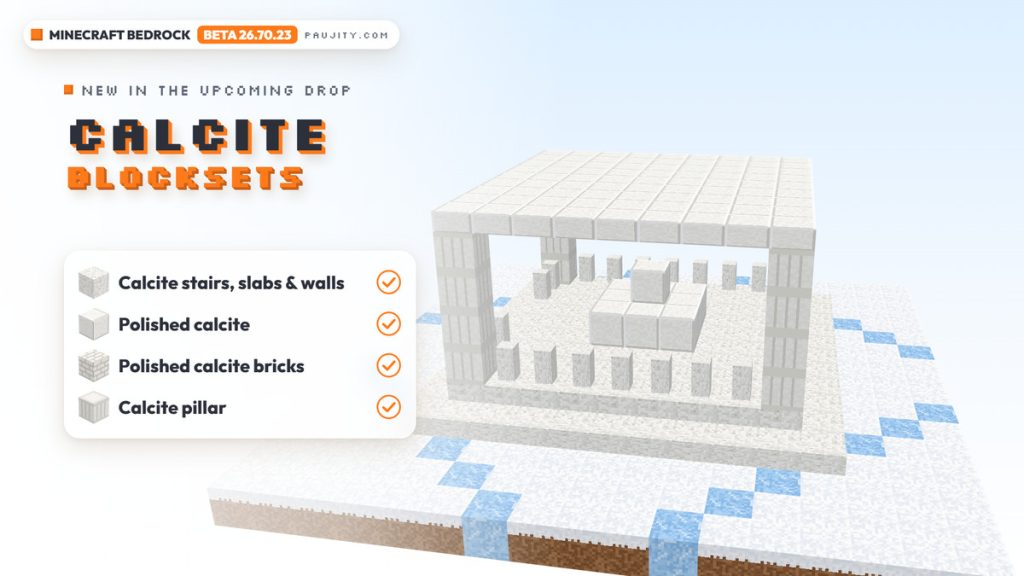
The star of this beta for builders is calcite. The plain calcite block already existed in the game, but it was a single cube with no extra shapes to combine, and that changes now. According to the changelog, regular calcite gets matching stairs, slabs and walls, and two new variants join the family: the Polished Calcite blockset and the Polished Calcite Brick blockset. Mojang highlights that polished calcite can also be used for pillars, bricks, double slabs and more, and there is a brand-new Calcite Pillar block as well. All of them are decorative building blocks, so they do not add a new mechanic, but they open a lot of possibilities for detailed constructions. Their pale, marble-like look fits perfectly in snowy biomes, and that is exactly how Mojang presents them: as a way to make any winter build look more elegant. Think of temples, gazebos, columns, castle trims or clean modern houses where you might have used quartz or diorite before. With stairs, slabs, walls and a pillar in the same color, calcite finally works as a complete palette instead of a single isolated block. 🏛️
5. The new “flurry” music disc and jukebox changes 🎵
Music lovers also have something new to look for. The beta adds a new music disc with the song “flurry”, composed by Hyper Potions, and it fits the frozen theme of the drop perfectly. According to the changelog, the disc has a 30% chance to appear inside igloo chests, and Mojang’s introduction points to igloo basements, so exploring snowy biomes and checking every igloo you find is the way to add it to your collection. Jukeboxes receive several related changes too: they no longer emit vibrations when you take or swap a music disc from their playlist, two inconsistent pixels in the jukebox side texture were fixed, and the “Use” tooltip now appears for every held music disc when you look at an empty jukebox. Players with the Music Features Add-On get clearer popups and chat messages when track discs cannot play, for example because online audio is turned off, the player is offline or no connected player owns the song, and track discs now have a two-second startup delay in block jukeboxes to handle online audio buffering. The Disc Press screen also improves, with sorting by song title, artist and duration and better keyboard and gamepad navigation. 🎵

6. Packed Ice gets redstone, stonecutter recipes and proper shade 🧊
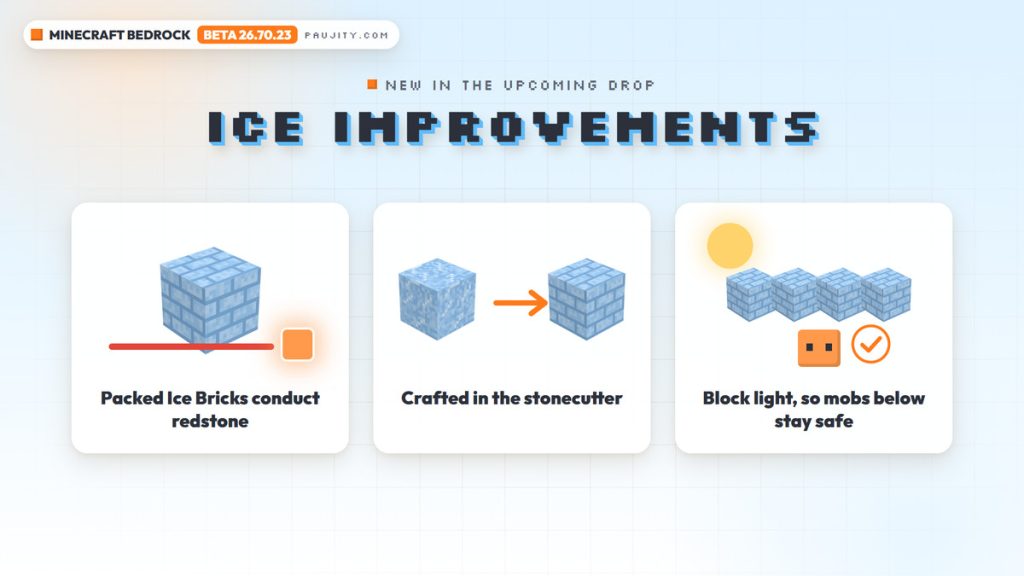
Ice blocks receive some of the most useful changes in this beta, especially for redstone fans and farm builders. Packed Ice Bricks and Chiseled Packed Ice now conduct redstone signals, so they can finally be part of your circuits and contraptions. Crafting the set is easier as well: Packed Ice and Packed Ice Bricks can now be used in a Stonecutter to make Packed Ice Bricks, Packed Ice Brick Slabs, Packed Ice Brick Stairs, Packed Ice Brick Walls and Chiseled Packed Ice, which makes it faster to produce every piece you need for a build. Lighting was improved too. Brittle Ice, Packed Ice Bricks, Chiseled Packed Ice and Snow Bricks now block light correctly, so mobs standing underneath them no longer burn in daylight, while regular Ice and Frosted Ice now reduce light by 1 instead of 3, matching their intended design. Finally, a couple of annoying details were cleaned up: Packed Ice Brick Walls no longer prevent chests from opening, and every part of the Packed Ice Bricks set now plays the correct sounds. If you build in snowy biomes, these changes make ice a much more practical material. 🧊
7. Freezing, Ice Ball and frosty mob fixes 🥶
The frozen features that arrived earlier in this drop, which we covered in our Minecraft Bedrock 26.60 review, also received a round of polish. Being on fire now prevents the Freezing effect from building up until the fire goes out, and standing in fire or lava while freezing no longer plays the fizz sound and particles over and over. Being killed by an Ice Ball now shows the correct death message, throwing an Ice Ball finally produces a sound and the correct closed caption, and parrots now play a sound when they imitate the Frostbite. Brittle Ice behaves more consistently as well: it respects the mob griefing game rule when a mob steps on it, and Strays no longer crack it when they stand on it. Frosted Ice and Cracking Ice now push items out of them, Icicles show the correct color on Explorer Maps, and block cracking textures no longer appear on the transparent parts of Icicles and other custom geometry blocks. There is also a curious fix for the undead: Zombies, Husks, Drowned and Skeletons wearing any piece of Leather Armor no longer convert when submerged in Powder Snow. 🥶
8. A mystery decorative block and the bug fixes you will notice 🛠️
One of the funniest lines in the changelog is also one of the most mysterious: in the Blocks section, Mojang simply wrote that it added a new decorative block to the game… somewhere. The notes do not say what the block is, what it looks like or where to find it, so keep your eyes open while you explore the beta and tell us if you spot it. Beyond that secret, version 26.70.23 includes many bug fixes you will notice while playing. On mobile devices, leaf transparency now works correctly when switching between Simple and Fancy graphics. Hoppers no longer collect dropped items more slowly when they are connected to a container below them, and hoppers and other containers no longer lose their items when they are replaced with the /fill or /setblock commands. Chest loot no longer differs on the same seed, and the player character on the new main menu no longer disappears after activating or deactivating a resource pack. Mojang also fixed a crash that could happen on PS4 when entering a world or adding a second player in split screen, solved a memory leak between the Play and world creation screens, and improved Ore UI loading times on Nintendo Switch. 🛠️
9. Accessibility, Realms, Marketplace and add-on creators 🧩
Accessibility and the user interface got plenty of attention too. The Create New World menu now includes tab descriptions in its narration, template cards read their number of ratings, and many sounds now show proper subtitles, including pigs, chickens, cows, cats and sheep when they are hit or killed, villagers working at their workstations, fishing bobbers hooking fish and leads being tied, untied or broken. In Realms, the game now selects your realm automatically when you claim a beta or preview realm and there is only one to choose from, and a crash related to reported Realms Stories posts was fixed. Several softlocks were solved as well, such as opening the social drawer too quickly at launch or backing out of the Marketplace after launching the game from a Store offer, and Marketplace images now load more reliably. Add-on creators get important technical news: several Script API features moved from beta to stable in version 2.12.0, including named block ticks and neighbor change events, and the minecraft:vibration_properties, minecraft:neighbor_change and minecraft:enchantment_power_transmitter block components were released. Custom blocks can now declare containers through minecraft:block_entity without the Upcoming Creator Features experiment. 🧩
10. How to join the Minecraft Beta on Android and our verdict ✅
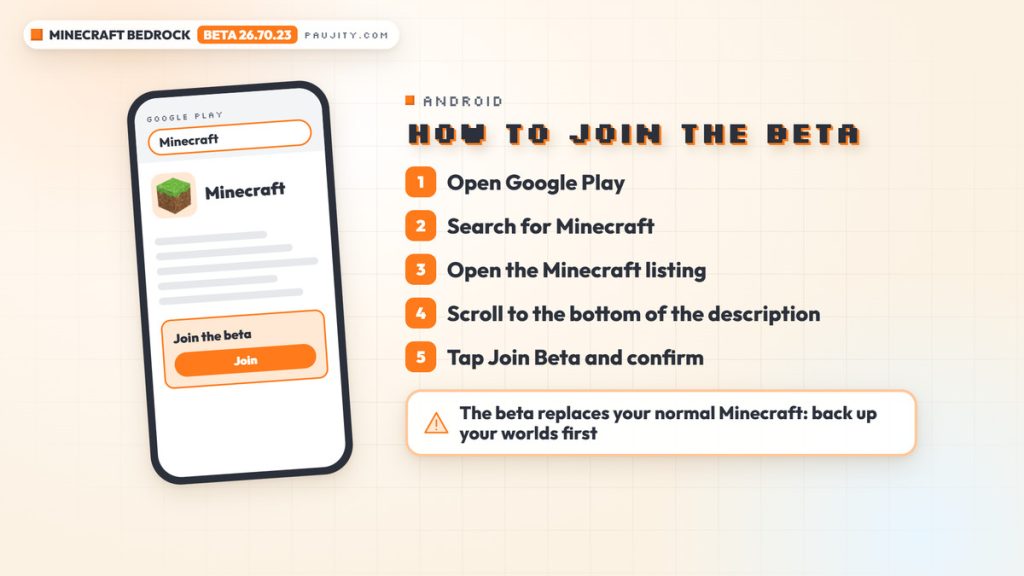
If you want to try all of this yourself on Android, Mojang’s official help article explains the process. Open the Google Play Store app, search for Minecraft and open the game’s listing, go to the bottom of the app description, select Join Beta and confirm with Join. To leave the program later, you simply repeat the same steps and choose Leave instead. There is one very important warning: on Android, Minecraft Beta replaces your normal Minecraft client, so Mojang highly recommends backing up your worlds before installing it. On Xbox, PlayStation, Windows and iOS, you need Minecraft Preview instead. Our verdict is very positive: the one-button off-hand swap is a quality-of-life change that Bedrock players will feel every day, the calcite blocksets give builders a complete white palette, “flurry” is a nice reward for exploring igloos, and the ice fixes make the winter blocks far more useful. Just remember that this is still a beta, so expect some bugs along the way. Tell us in the comments what you think about the off-hand swap and which block you believe is the mystery one! ✅
- One-button off-hand swap on keyboard and controller
- Calcite stairs, slabs, walls, polished calcite, bricks and a pillar
- The new “flurry” music disc by Hyper Potions
- Packed Ice that conducts redstone and blocks light correctly
- Beta and Preview builds can be unstable
- Known issue: some off-hand items can’t be swapped with the keybind yet
- The changelog doesn’t mention touch controls for the swap
- On Android the beta replaces your normal game, so back up your worlds
[…] off-hand swap was the star of the previous beta, which we covered in our Minecraft Beta & Preview 26.70.23 review, and this version already improves it. The changelog fixes an issue where the “Swap Off-hand” […]