
1. What Bare Bones is 🧴
If you have ever watched an official Minecraft trailer and thought the game looked cleaner and more colorful than on your phone, you are not imagining it. Mojang and its partners often use a simplified art style for marketing renders, animations and promotional images, with flat colors and very little texture noise. Bare Bones is a resource pack created by the artist known as Robotpants that recreates that exact feeling inside the real game. Instead of the detailed, slightly noisy pixels of the default textures, blocks become smooth and bold: grass is a clean green, stone is a soft gray and wood has simple lines. The result looks like you are playing inside the trailer itself. Over the years the pack became one of the most downloaded texture packs in the community, and players on Minecraft Bedrock and Minecraft PE wanted it just as much as Java players. In the videos embedded in this article I show how it looks on Bedrock 26.x on a real phone, and in this guide I explain its background, its strengths and how to combine it with shaders to get the full cinematic effect. 🎥
2. A short history of Minecraft textures 🎨
To understand why Bare Bones feels so special, it helps to remember how Minecraft textures evolved. The game has always used 16×16 pixel textures for blocks, a choice that defines its iconic look. In the early years, many textures were created quickly and had a rough, inconsistent style. In 2019, during the Village and Pillage era, Mojang released a large texture update that redesigned almost every block to make the style more consistent, readable and modern while staying true to the original. That update set the visual base we still play with today. At the same time, trailers and marketing art went in a slightly different direction, with cleaner shapes designed to look good on posters and in animations. Texture artists noticed the gap, and packs like Bare Bones appeared to bring the marketing style into the game. This is a recurring story in Minecraft: the community takes an idea from outside the game and turns it into something playable. It is the same spirit that later produced shaders for mobile, animation packs like Actions and Stuff, and even official features like Vibrant Visuals. 📚

3. Why the trailer look is so loved 💛
There are three main reasons why so many players prefer the trailer style. The first is readability. With less noise in the textures, ores, blocks and items are easier to recognize at a glance, which helps on small phone screens. Diamonds and iron stand out clearly inside stone, and building details are easier to see. The second reason is aesthetics for builders. Flat colors make houses, castles and cities look like official artwork, and they combine beautifully with screenshots and thumbnails. Many creators use Bare Bones when recording builds because it makes everything look cleaner on video. The third reason is nostalgia and identity. For a whole generation of players, the Minecraft they imagine is the one from trailers, animations and merchandise. Playing with Bare Bones feels like stepping into that imagined version of the game. Of course, not everybody likes it. Some players feel the default textures have more character and depth. That is the beauty of resource packs: you can switch styles in seconds and decide which version of Minecraft you want to live in today. 📸
🧠 Interactive concept map
🧑🎨 Origin
Created by Robotpants to recreate the clean style of official trailers.
🧱 Style
Same 16×16 resolution, flat colors, clear outlines, readable ores.
⚡ Performance
As light as vanilla. Great for low-end Android phones.
🌅 Shaders
Pair with a light Newb style shader via Patched, MB Loader or BetterRenderDragon.
🎬 Alternative
Flat trailer pack from the Actions and Stuff team, made to match their animations.
✅ Achievements
Resource packs do not disable achievements on Bedrock.
👆 Tap any branch to open it
4. How it differs from the default textures 🔍
Bare Bones keeps the same 16×16 resolution as vanilla Minecraft, so it is not a high definition pack. What it changes is how the pixels are used. Default textures use many shades in each block to simulate depth and detail, while Bare Bones reduces those shades to a few flat tones with clear outlines. Grass loses its noisy pattern, stone becomes calm and smooth, ores get bright, simple shapes, and wood shows clean planks. Mobs and items are also redesigned in the same spirit, which makes zombies, creepers and villagers look like their animated versions. The user interface usually stays close to vanilla, so menus remain familiar. Because the pack touches so many blocks, it is important to use a version that is updated for the current game. New blocks from recent drops, like the poplar wood and cushions from Wilderness Bound or sulfur and cinnabar from Chaos Cubed, will appear with default textures if the pack has not been updated yet, which can look a bit mixed until the creator catches up. 🧱
5. Performance on phones 📱
One of the best advantages of Bare Bones is that it is light. Since the textures have the same resolution as vanilla, your phone does not need extra memory or processing power to load them, unlike 64x or 128x realistic packs that can cause lag on low-end devices. In practice, playing with Bare Bones feels almost identical to default in terms of performance, and on some devices the flat textures can even look sharper at lower render distances. This makes it a perfect choice for the many Latin American players who use budget Android phones. If you want to improve the look of your game without sacrificing frames, a clean texture pack is the safest first step before trying heavier options like shaders. It also works well when recording gameplay, because simpler textures compress better in videos, which means your recordings keep quality even at lower bitrates. If you play on a tablet or a mid-range phone, you will have plenty of room to add a light shader on top, which is exactly the combination that creates the true trailer effect, as we will see next. ⚡
6. Bare Bones plus shaders: the cinematic combo 🌅
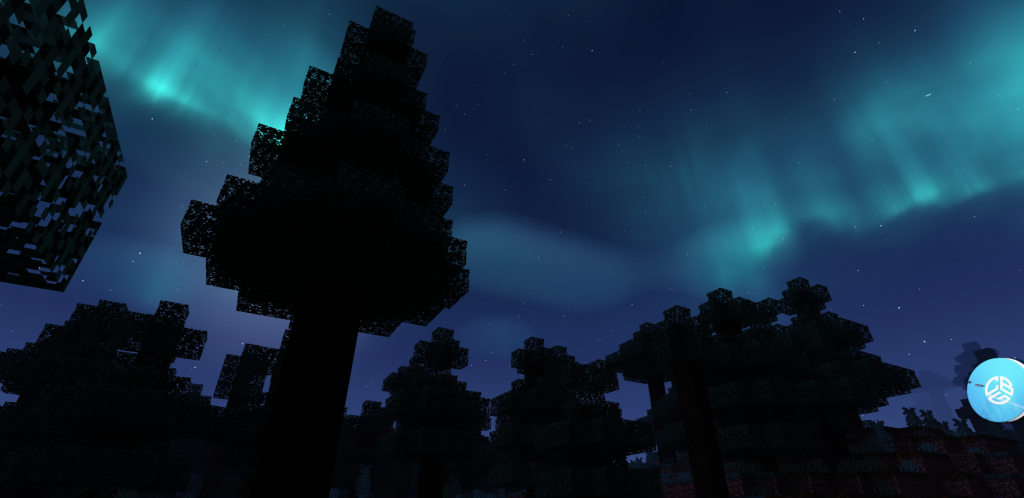
Textures change the surfaces, but lighting changes the mood. That is why the most impressive Bare Bones setups always include a shader. On Bedrock, custom shaders work through the RenderDragon engine using tools such as Minecraft Patched, MB Loader or BetterRenderDragon on Windows, which load special shader packs like the popular Newb family. A light shader adds soft sunlight, waving leaves, nicer water and gentle fog, and together with flat textures the result looks like a scene from an official animation. Years ago I showed this on my channel with a shader called Vert Legacy and Bare Bones, and the reaction was incredible. Today the options are even better. If your phone supports Vibrant Visuals, Mojang official graphics mode, you can also try it with simple textures, although Vibrant Visuals is designed around its own material system, so results vary depending on the pack. My recommendation is to start with Bare Bones alone, then add a low-end shader, and only then try heavier lighting if your phone stays above thirty frames per second. 🌞
7. The flat trailer pack from the Actions and Stuff team 🎬
Bare Bones is not the only way to get the trailer look anymore. In one of my recent videos I showed a flat texture pack made in the same spirit by the team behind Actions and Stuff, the famous animation and texture pack for Bedrock. It follows the same idea of clean colors and simplified pixels, but it is designed to match the animations and visual updates of their main pack, so everything feels consistent when you combine them. For players who already love Actions and Stuff, this is a natural option, because the animations of mobs, items and the player blend perfectly with the flat style. The trade-off is that each pack has its own interpretation of the trailer look, so some blocks may feel different from the classic Bare Bones. My advice is to try both on the same world and compare screenshots side by side. Look at grass, stone, ores and wood, since those are the blocks you will see the most. Choose the one that feels right for your builds, because in the end texture packs are a personal taste. 🤩
| Pack style | Resolution | Look | Phone impact | Best for |
|---|---|---|---|---|
| Vanilla default | 16x | Detailed, slightly noisy | None | Classic feel |
| Bare Bones | 16x | Flat, trailer style | None | Builders and creators |
| Flat pack by Actions and Stuff team | 16x | Flat, matches animations | Low | Animation pack users |
| Realistic HD packs | 64x to 256x | Photo realistic | High | High-end devices |
| PBR packs for Vibrant Visuals | Varies | Lit materials | High | Supported GPUs |
Tap a column header to sort ⇅
8. How to install it on Bedrock 26.x 📥
Installing a texture pack on Minecraft Bedrock is simple. Download the pack from a trusted source in .mcpack format. On Android, tap the file and choose to open it with Minecraft, and the game will import it automatically. On Windows, double click the file. If you receive a .zip instead, you may need to rename it to .mcpack or extract it into the resource packs folder. Once imported, open Settings, go to Global Resources and activate the pack, or activate it only in a specific world from the world settings. If you use several packs, remember that the order matters: the pack at the top overrides the ones below. Put shaders and UI packs where the creator recommends. A useful fact for survival players: on Bedrock, resource packs like Bare Bones do not disable achievements, because they only change visuals. Behavior packs and addons that change gameplay are the ones that can affect achievements. Finally, always check that the pack version is made for 26.x, since very old versions may show missing textures for newer blocks. ✅
9. Common problems and how to fix them 🛠️
If something looks wrong after installing, there are a few usual suspects. If some blocks show the default texture, the pack probably does not include the newest blocks yet, so look for an updated version. If you see purple and black squares, the pack is outdated or corrupted, and reinstalling from the original source usually solves it. If the pack does not appear in your list, the file may have been downloaded as a zip inside another zip, so extract it once and try again. If the game crashes after activating several packs at once, try them one by one to find the conflict, starting with UI packs, which are the most sensitive to new versions. On phones, clearing the game cache or restarting after an update also helps. Another common confusion is between textures and shaders. Bare Bones alone does not add shadows or reflections; that comes from shaders. And remember that shaders using Patched or MB Loader depend on the exact game version, while textures are more forgiving. When in doubt, test in a new Creative world before activating packs in your main survival world, so you never risk your progress. 🔧
10. Conclusion: play inside the trailer 💚
Bare Bones proves that improving Minecraft does not always mean adding more detail. Sometimes removing noise is what makes the game look beautiful. Its clean colors, readable blocks and light performance make it one of the best texture packs for Minecraft Bedrock and Minecraft PE, especially on phones where every frame counts. Combined with a good shader, it turns your world into something that looks straight out of an official animation, and it is a fantastic base for builders, content creators and anyone who loves the trailer style. If you prefer a version that matches animations, the flat pack from the Actions and Stuff team is a great alternative. Just remember to use versions updated for 26.x so new blocks from Chaos Cubed and Wilderness Bound look right. You can watch all three of my Bare Bones and flat texture videos embedded in this article to see how they look in real gameplay on mobile. If you try it, tell me in the comments of my channel PAU07 which combination you liked most. See you in the next texture review! 🎈