
Minecraft Bedrock Edition has just rolled out its highly anticipated 26.30 update, officially titled the Chaos Cubed drop. This massive update completely transforms the Overworld’s underground layout by introducing highly interactive biomes, a chaotic new mob, and massive under-the-hood engine upgrades. Players across Android, iOS, Xbox, PlayStation, Switch, and Windows can dive into these brand-new survival features starting today.
The headline feature of this update is the arrival of the brand-new Sulfur Caves biome deep beneath the surface. This striking underground environment replaces ordinary stone with deep veins of vibrant Sulfur and bright Cinnabar blocks. Exploring these depths feels entirely different from standard caving, offering a visually stunning yet hazardous adventure for players looking to harvest rare materials.
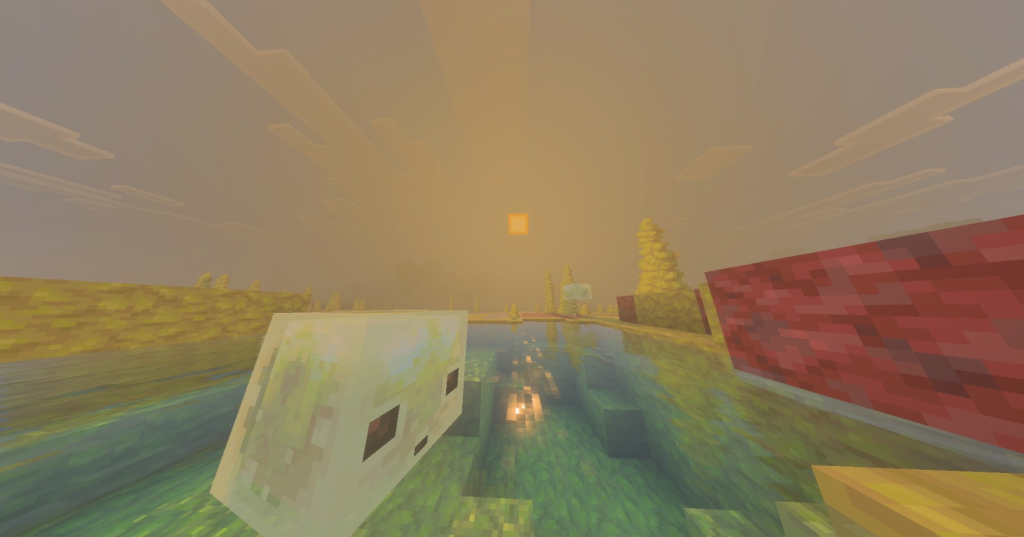
To guide players toward these deep subterranean hollows, Mojang has introduced Sulfur Springs generating right on the surface. These giant bubbling pools act as natural landmarks on flatter terrain, signaling to explorers that a massive Sulfur Cave lies directly underneath them. The generation mechanics ensure these springs expand significantly in size without destroying the local flora and trees.
Diving into the specific generation mechanics, the development team has completely reworked the block gradients inside the Sulfur Caves. In order to keep the aesthetic clean and immersive, Tuff and Granite blocks have been entirely removed from the cave walls. Instead, you will find incredibly clean transitions between Cinnabar, Sulfur stone, and Deepslate as you delve deeper.
Environmental hazards are also reaching a new level of immersion due to custom-tailored water effects. The water fog inside the Sulfur Caves has been updated from standard blue to an eerie, toxic looking green. This change completely alters underwater visibility, making navigation through submerged tunnels a tense and atmospheric experience.
Beyond the visual upgrades, the blocks themselves boast significantly enhanced properties and utility features. The basic Sulfur and Cinnabar stone sets have had their explosion blast radius doubled from a value of 3 up to 6. This makes them highly volatile under the right circumstances, forcing players to be incredibly careful when mining with explosives nearby.
Builders will also appreciate the addition of new decorative choices within this chemical stone family. Players can now craft Chiseled Sulfur and Chiseled Cinnabar blocks directly from their respective slabs, offering unique geometric patterns. However, standard survival logistics still apply, meaning you can no longer attach handy leads to Sulfur or Cinnabar walls.
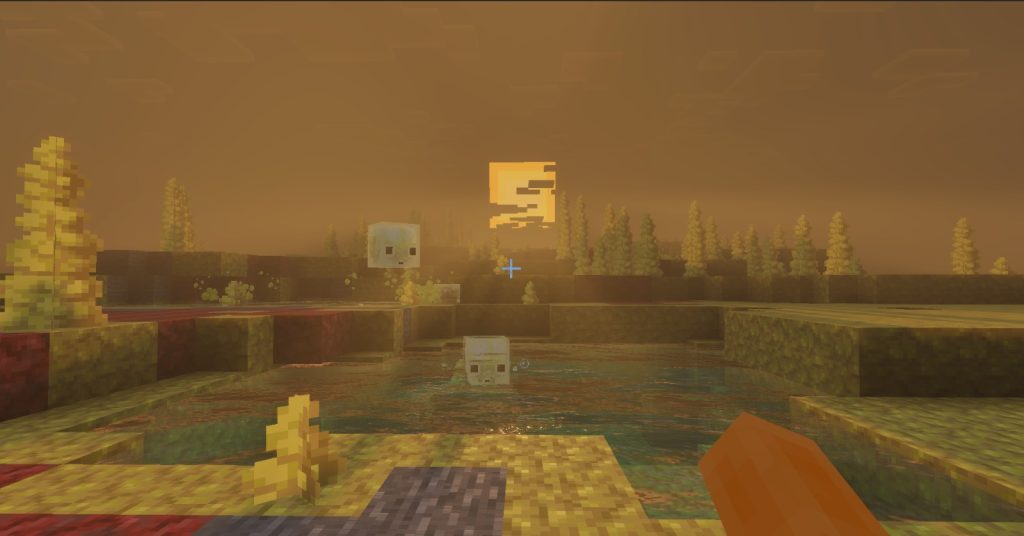
The undisputed star of the entity updates is the brand-new Sulfur Cube mob, an unpredictable creature with a massive appetite. This fascinating entity hops around the new cave biomes and interacts dynamically with the blocks surrounding it. Depending on what the Sulfur Cube consumes, its behavior, physics, and movement archetypes change dramatically on the fly.
One of the most significant changes introduced in the beta tuning phase was the reduction of the Sulfur Cube’s total health. Developers lowered its maximum health pool from 9 points down to 8 points to balance survival encounters. Additionally, the mob has received comprehensive audio passes, featuring unique sound effects for landing, jumping, absorbing blocks, and ejecting items.
The physics of the Sulfur Cube depend entirely on a new system called block-based behavioral archetypes. For instance, the newly introduced Slow Bouncy archetype gives the creature massive knockback resistance while slowing down its jump height. This specific behavior is automatically triggered whenever the cube comes into contact with stone-type blocks.
On the flip side, the standard Regular archetype is now strictly reserved for dirt-type surfaces and Concrete Powder. This means the cube will hop much faster and cover more ground when roaming across organic terrain. Navigating these differing archetypes adds a fun layer of strategy if you are trying to trap or domesticate one.
Perhaps the most chaotic feature of the Sulfur Cube is its ability to safely absorb active TNT blocks into its body. Once a cube sucks up a piece of TNT, that hidden explosive can be primed by Redstone signals, fire sources, or nearby blast waves. This turns the mob into a walking, ticking time bomb capable of clearing massive areas.
The timing of the internal explosion depends entirely on how the hidden TNT block inside the cube was originally primed. If ignited via fire or direct Redstone power, the absorbed TNT utilizes a safe, predictable fuse time of 6 seconds. This gives players just enough time to run away or position the creature strategically.

However, if the absorbed TNT inside the Sulfur Cube is primed by an external explosion, chaos truly takes over. In this scenario, the fuse time shifts to a randomized window lasting anywhere between 0.75 and 3 seconds. This rapid, chain-reaction potential makes handling explosive cubes in combat situations an incredibly high-stakes gamble.
Keeping an explosive-laden Sulfur Cube under control comes with several very strict technical limitations in survival mode. For safety and balancing reasons, players are completely locked out from picking up a primed, TNT-infused cube using a standard Bucket. Additionally, these specific primed variants cannot be sheared or damaged by conventional weapons before they detonate.
The explosive payoff is incredibly clean from a technical perspective, avoiding unnecessary entity lag on your device. Upon detonation, the massive blast waves destroy surrounding blocks, but absolutely no Small Sulfur Cubes will spawn from the wreckage. This prevents infinite entity duplication loops that could otherwise tank your game’s frame rate.
Smaller variants of this creature have also seen major bug fixes to ensure consistent gameplay behavior. Mojang resolved an annoying issue where Small Sulfur Cubes would occasionally spawn completely by accident out of a regular Bucket. This ensures that capturing and transporting your cubes remains completely predictable without random entities escaping.
Furthermore, a bizarre physics glitch involving the Small Sulfur Cube and the classic Water Bucket has been completely resolved. Previously, splashing water on a small cube would make it vanish into thin air while placing the water source block at coordinates 0,0,0. This world-origin bug is now history, and water interacts properly with the mob wherever it stands.
Trading systems have also been updated to integrate these new industrial items seamlessly into the existing economy. Wandering Traders now have a distinct chance to carry and sell rare Sulfur Spikes during their random world appearances. This gives surface dwellers a peaceful alternative path to obtaining these hazardous subterranean resources.
Crafting recipes have also been streamlined to make harvesting these new blocks highly rewarding for industrial players. If you manage to collect four individual Sulfur Spikes, you can combine them on a crafting grid to yield one full-size Sulfur block. This allows for clean inventory compression during long, exhausting mining expeditions deep underground.
Moving past the brand-new content, version 26.30 includes a massive list of parity fixes to align Bedrock closely with Java Edition. One critical fix addresses a long-standing bug where entities sitting on the exact edge of partial-height fluid blocks were still affected by the liquid. Now, water and lava physics respect exact collision bounds perfectly.
Agricultural mechanics have received a major logical upgrade concerning bee pollination routines and target blocks. A persistent bug preventing bees from pollinating beautiful Spore Blossoms and Chorus Flowers has been successfully patched out. Bees will now happily buzz around these flora variants, collecting pollen and behaving exactly as nature intended.
Following up on this change, bees now exhibit a strong attraction to players who happen to be holding these specific plants. If you carry a Spore Blossom or a Chorus Flower in your hand, nearby bees will follow you across the map. This makes guiding bees to your custom-built greenhouses much easier without relying solely on traditional flowers.
Breeding loops for these helpful insects have also been expanded to incorporate the unique foliage of the Overworld and the End. Players can now successfully breed and rapidly age bees using both Chorus Flowers and Spore Blossoms. This gives players a lot more flexibility depending on which dimension they choose to build their main bases in.
For world generation fans, trees growing in close proximity to Spore Blossoms or Chorus Flowers received a subtle mechanic tweak. These specific trees now have a proper, calculated mathematical chance to generate natural beehives upon growing to adulthood. This brings the ecological systems of these unique plants up to par with traditional oak and birch trees.
Nether survivalists will be thrilled to hear that Nether Strider loot drop mechanics have finally been corrected. For a long time, a bug prevented the Looting Enchantment on swords from affecting the amount of string dropped by Striders. With this update, killing a Strider with a Looting III sword rewards you with the maximum amount of items possible.
XP collection logic has also been heavily optimized for entities that float or fly high above the ground. Experience Orbs will no longer spawn at incorrect, unreachable heights after a player defeats a Bee, a Phantom, or a Vex. The glowing orbs now drop predictably at the precise location where the mob was originally defeated.
Initial world loading performance has been drastically optimized, especially when launching older or heavily explored survival worlds. A bug that caused major performance degradation when loading custom dimensions with massive sections of empty air blocks has been fixed. This results in incredibly smooth loading screens and faster entry into your games.
Vehicle physics have also been ironed out to prevent annoying camera loops when riding entities across the terrain. Vehicles utilizing a non-zero rotation lock value will no longer spin uncontrollably when a player sits in them without giving movement inputs. This ensures boats and custom modded mounts remain perfectly steady when idle.
For achievement hunters who enjoy using custom content, Mojang has made a highly welcoming quality-of-life interface change. The system has completely removed the scary warning text stating “you can’t earn achievements” when creating worlds with Add-ons active. This cleans up the menu interface and removes unnecessary confusion for casual bedrock players.
On the technical graphics front, Texture Streaming is now enabled by default for all supported PC and mobile devices. This streaming technology dynamically loads textures into your graphics memory on the fly rather than keeping everything loaded at once. This significantly reduces overall RAM consumption while maintaining beautiful visual fidelity.
The development team spent considerable time fixing visual bugs associated with this new default texture streaming system. A major issue where shulker boxes and various random blocks appeared completely semi-transparent in the inventory has been fully resolved. Your item screens will now render perfectly opaque textures without any strange transparency glitches.
Furthermore, an issue causing streamed textures to turn completely invisible after being away from the player’s screen has been fixed. You will no longer experience moments where blocks look hollow or missing when turning your camera around rapidly. The engine now caches and reloads these assets seamlessly as you move throughout the environment.
For players using advanced graphical modes, the update delivers incredible stability updates to the engine’s lighting pipelines. A major game crash that occurred when utilizing structure blocks containing glowing light blocks in Ray Tracing mode has been fixed. This allows high-end creators to duplicate illuminated builds safely without crashing to desktop.
Additionally, the development team put a permanent stop to an issue causing constant, heavy hard drive read-and-write activity. Previously, the engine’s internal texture cache was flushing data to disk on every single frame, causing extreme hardware strain. This fix eliminates unnecessary disk wear and tear, resulting in smoother frame delivery.
Multi-player fans who enjoy split-screen gaming on consoles will notice a massive reduction in distracting visual artifacts. A graphical bug where dithered objects and shadows would flicker violently on split-screen boundaries has been successfully ironed out. This provides a much cleaner, unified visual experience when sharing a couch with your friends.
For players utilizing the stunning Vibrant Visuals lighting packs, item rendering logic has been significantly improved. Handheld items will no longer clip awkwardly through solid geometry when your character is standing directly inside a block. This fix ensures that your swords, maps, and tools render clearly without disappearing into nearby walls.
This same clipping fix has also been carefully ported over to the standard Fancy graphics mode for complete visual parity. Certain items in hand that refused to render at all while standing close to walls are now perfectly visible. These subtle adjustments ensure that combat and mining viewpoints remain clean and predictable at all times.
Snow Golems have received specific visual rendering fixes across multiple advanced graphics settings in this new version. Their blocky pumpkin heads will no longer render as completely black shapes when playing with Vibrant Visuals turned on. This brings back their classic look while allowing you to enjoy enhanced atmosphere and lighting.
Similarly, if you are a player who prefers running the game with ray tracing options active, Snow Golems behave much better. Their heads will no longer completely disappear from the character model when you step too close to them. This ensures their models remain completely intact regardless of your proximity or field of view.
Boss battles are now significantly more cinematic due to the introduction of custom environmental fog mechanics in the End. A thick, atmospheric Boss Fog will now envelop the central island as long as the Ender Dragon remains alive. This dramatic fog effect clears away beautifully once the dragon is finally defeated by the player.
The update also fixes a handful of critical mobile-specific bugs affecting players on various Android devices. A major issue where dropped items would visually render behind solid terrain while using Ray Tracing has been patched. This ensures you can easily spot your dropped loot on the ground after a dangerous fight.
Furthermore, specific character animations that were completely broken or frozen on select mobile chipsets are now functioning perfectly. Players on affected Android hardware will finally see fluid mob movements, swinging arms, and natural environmental animations. This fixes long-standing hardware compatibility discrepancies across the mobile ecosystem.
For technical map makers and addon creators, the fog JSON schemas have been upgraded to target version 1.26.20. This allows creators to define precise keyframes for advanced volumetric fog data, including custom absorption and scattering coefficients. You can now build highly customized atmospheric lighting effects for your adventure maps.
Chat and command enthusiasts will notice that the auto-complete system behaves much more accurately when typing out complex scripts. Fixed a bug where auto-completing custom block states with integer values showed incorrect zero-based indices instead of actual values. Your commands will now execute exactly as written without index shifting.
A major backend change introduces the new playerWaypoints game rule, which completely replaces the old, outdated locatorbar toggle. This new game rule accepts values of “off” to hide players or “everyone” to make all players visible on the map. Old worlds will automatically migrate to this new system without losing settings.
The classic text-based feedback system has also been cleaned up to prevent chat screens from becoming heavily cluttered. The popular /stopsound and /playsound commands will now produce exactly one single success or failure message upon completion. This prevents massive spam blocks from flooding the chat box during heavy command block operations.
Console players on the latest hardware platforms will experience a noticeable boost in overall performance and frame stability. Mojang highlighted specific optimizations for the PlayStation 5 edition, allowing it to utilize native hardware features much more effectively. This translates to incredibly smooth chunk rendering and steady performance during chaotic multiplayer sessions.
The classic user interface has also received excellent polish, specifically focusing on text input fields and controller navigation. Players using controllers will no longer find buttons at the bottom of scrolling panels becoming completely unselectable. Text fields now support double-tapping to highlight a single word, and triple-tapping to instantly select all text.
Ultimately, Minecraft Bedrock 26.30 stands out as an incredibly balanced update that blends chaotic fun with necessary technical refinement. From the volatile depths of the Sulfur Caves to the underlying engine optimizations like texture streaming, this version sets a fantastic foundation for future content drops. Update your game launchers today and get ready to explore the chaos yourself!