

1. Why shaders still matter in 2026 ☀️
Even with official graphics improvements, shaders remain one of the most popular ways to transform Minecraft Bedrock. A shader changes how light, shadows, water, sky and fog are drawn, turning the classic flat look into sunsets with golden light, waving leaves, reflective water and atmospheric nights. In the Latin American community, shader videos are some of the most watched, because almost everyone wants their phone to look like the beautiful clips they see on social media. My video about the 5 best shaders for Minecraft Bedrock 26.52 for low, mid and high-end devices is embedded at the top of this article, and it was designed to answer the question I receive the most: which shader should I use on my phone? In this article I go deeper into the background: how shaders on Bedrock evolved, why they need special tools today, what makes one shader light and another heavy, and how to choose the right one for your device. With this knowledge you will not just copy a recommendation, you will understand why it works, and you will be able to judge any new shader that appears. 🌅
2. From GLSL packs to RenderDragon 📜
Years ago, shaders on Bedrock were surprisingly easy. Resource packs could include GLSL shader files, and packs like ESBE, BSBE and many others worked by simply activating them, even on phones. Then Mojang introduced a new rendering engine called RenderDragon, rolled out across platforms in the early 2020s. RenderDragon brought better performance, support for RTX and a foundation for future graphics, but it also closed the door to the old shader method. Suddenly, almost all classic shader packs stopped working, and the community thought mobile shaders were dead. That did not last. Creators discovered ways to load custom material.bin files, the compiled shader materials RenderDragon uses, through modified clients and loaders. Tools like Minecraft Patched on Android, MB Loader and BetterRenderDragon on Windows made it possible again, and shader families like Newb X Legacy by devendrn became the base for many popular packs. This history explains why today shaders require extra steps and why they depend so much on the exact game version. In my article about the evolution of graphics in Bedrock I go even deeper into this story. 🕰️
3. How shader tiers work 📊
Not all shaders cost the same. The workload depends on the effects they calculate every frame. Light shaders mostly change colors, sky and fog, and add simple effects like waving plants and better water color; these are cheap and run on almost any phone. Mid shaders add stronger lighting, smoother shadows simulated with tricks, better reflections and clouds, which need more GPU power. Heavy shaders use more advanced techniques like deferred rendering, real-time shadows, screen space reflections and volumetric light, which look incredible but demand modern hardware. Your phone GPU, its temperature, the screen resolution and even the battery saver mode all affect results. That is why I organize recommendations by tiers: low, mid and high-end. A low-end phone with a heavy shader will overheat and drop frames, while a high-end phone with a very light shader wastes its potential. The goal is to find the most beautiful shader that keeps your game smooth, ideally above thirty frames per second for survival and higher for PvP. Thinking in tiers is the key to choosing well. ⚙️
🧠 Interactive concept map
📜 History
GLSL packs, then RenderDragon closed them, then material.bin shaders returned.
📱 Low tier
Light Newb family shaders: sky, fog, waving plants, better water.
🌤️ Mid tier
Spectrum or Natural Visuals style: richer light and atmosphere.
🔥 High tier
Deferred shaders like Eternity: real-time shadows and reflections.
🌟 Vibrant Visuals
Official mode, no loaders, limited to supported GPUs.
🛠️ Loaders
Patched and MB Loader on Android, BetterRenderDragon on Windows.
👆 Tap any branch to open it
4. Low-end tier: beauty without lag 📱
For low-end devices, the best options are light shaders, many of them based on the Newb family. On this blog I have reviewed several variations, like Newb Daylight, Newb Ale, Newb Sapphire, Newb Manyzz and Newb Tropisphere, each with its own color palette and atmosphere. These shaders keep the effects simple: richer sky colors, soft fog, waving leaves and improved water, without expensive shadows. The result is a world that looks much more alive while staying smooth on phones with modest GPUs. Choosing between them is mostly a matter of taste. Some prefer warm sunsets, others cool and clean daylight, others tropical saturated colors. In my dedicated video about the best low-end shaders I compare a few side by side, and I have another article focused only on that tier. If your phone has 3 or 4 GB of RAM and a basic GPU, start here. Combine a light shader with a normal or flat texture pack like Bare Bones, keep render distance moderate, and you will be surprised how good Minecraft can look without lag. 🌿
5. Mid tier: richer light and atmosphere 🌤️
Mid-range phones can handle shaders with stronger lighting and more atmosphere. Packs like Spectrum or Natural Visuals, which I reviewed here on the blog, add more detailed skies, better clouds, warmer lighting and more convincing water. Some mid tier shaders simulate shadows in clever ways that look good without the full cost of real-time shadows. This tier is where many players find the perfect balance: the world looks dramatically better than vanilla, but the game still runs at a stable frame rate on phones from the last few years. To get the most from mid tier shaders, pay attention to temperature. Long sessions can heat the phone, and when it gets hot it reduces performance automatically. Playing with the phone out of its case, avoiding charging while playing and lowering brightness can help. Also try different times of day before deciding, because some shaders look amazing at sunset but too dark at night. Mid tier is also the best tier for content creators on a budget, since recordings look great without constant stutters. 🎨
6. High-end tier: deferred lighting and realism 🔥
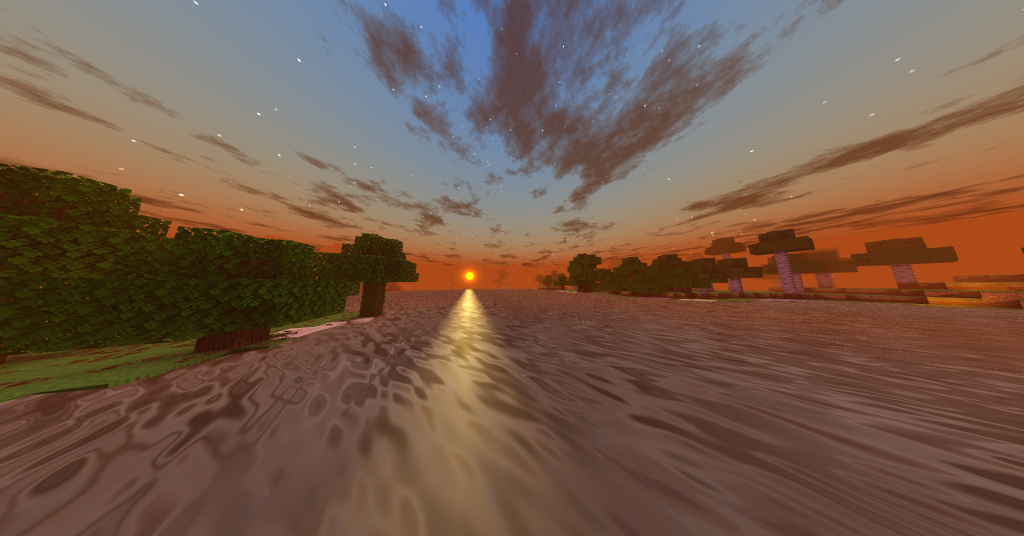
On high-end phones, tablets and PCs, you can try the heaviest shaders. These use deferred rendering, a technique that calculates lighting in a separate pass, allowing real-time shadows from the sun, colored light from torches, reflections and volumetric effects. Shaders like Eternity in its deferred versions are famous for this, and I covered it in my video about the most realistic shader for Minecraft Bedrock 26.52. Combined with PBR texture packs, these shaders produce images that look closer to Java shaders like those used in cinematic videos. On Windows with BetterRenderDragon, some setups can go even further. The cost is real: heavy shaders can drain battery quickly, heat the device and require lower render distances. They are best for screenshots, cinematic recordings and calm building sessions rather than long PvP. If you have a gaming phone with an advanced GPU, high tier shaders are worth trying at least once, because they show how far the Bedrock community has pushed the engine. Just remember to compare with Vibrant Visuals, which may offer similar beauty with official support. 🎬
7. Vibrant Visuals vs custom shaders 🌟
Since Mojang launched Vibrant Visuals, many players ask if custom shaders still make sense. Vibrant Visuals is an official graphics mode with directional lighting, shadows, volumetric fog, reflections and PBR support, and it works without patched apps or loaders. On supported devices, including Android phones with GPUs like Adreno 640, Mali-G68, Mali-G77, Xclipse 530 or higher, it is often the easiest way to get beautiful graphics. Mojang even made a short list of recommended shaders and packs that I discussed in one of my videos. However, custom shaders still have important advantages. They work on many devices that cannot run Vibrant Visuals, they offer a huge variety of styles, from fantasy colors to extreme realism, and they can be lighter than Vibrant Visuals on mid and low-end hardware. On the other hand, custom shaders depend on loaders that must be updated after every Minecraft version, while Vibrant Visuals updates automatically. The best choice depends on your device: if Vibrant Visuals runs smoothly, try it first; if not, custom shaders remain the best path. ⚖️
| Tier | Example shaders | Main effects | Typical device | Heat and battery |
|---|---|---|---|---|
| Low | Newb Daylight, Newb Ale, Newb Sapphire | Sky, fog, waving plants | Budget Android | Low |
| Mid | Spectrum, Natural Visuals | Richer light, clouds, reflections | Mid-range phones | Medium |
| High | Eternity deferred | Real-time shadows, volumetrics | Gaming phones and PC | High |
| Official | Vibrant Visuals | Directional light, fog, PBR | Supported GPUs | Medium to high |
Tap a column header to sort ⇅
8. Installing shaders on each platform 📥
Installation depends on your platform. On Android, the most common methods are Minecraft Patched, a modified version of the game that allows custom materials, and MB Loader, which loads shader materials in a different way. Both depend on the game version, so a shader for 26.52 needs a loader compatible with 26.52. On Windows, BetterRenderDragon is the reference tool, and it can also enable extra rendering features. On iOS and consoles, options are much more limited because the systems are closed, so Vibrant Visuals is usually the main path there. Once your loader is ready, you import the shader as a resource pack and activate it in Global Resources. Always read the shader page for its requirements, because some only work with one method. And please be careful with downloads: use known sources, avoid files that ask for strange permissions and never give your Microsoft account password to any tool. In my installation videos I show each step on a real phone, so you can follow along without guessing. 🛠️
9. Settings that make any shader run better 🔧
A few settings can make the difference between a laggy shader and a smooth one. Lower render distance first; shaders multiply the cost of every chunk you see. Reduce simulation distance if you do not need far farms running. Turn off fancy leaves and smooth lighting if the shader already handles lighting. Avoid stacking heavy texture packs with heavy shaders on mid or low-end devices. Close background apps, disable battery saver and keep your phone cool. Many shaders also include their own configuration options, letting you disable effects like waving plants or volumetric clouds. Test in a busy area like a village or a forest at sunset, because that is where shaders are most demanding. Use an FPS counter if your setup allows it. Finally, update thoughtfully: when a new Minecraft version arrives, like the hotfixes 26.51 and 26.52, loaders and shaders may need updates too, so wait for confirmation before updating your main game if shaders are important to you. These habits apply to any shader you try, now and in the future. ⚡
10. Conclusion: the right shader for your device 💚
Shaders on Minecraft Bedrock have survived a dramatic history, from simple GLSL packs to the closure brought by RenderDragon and the creative comeback with material.bin shaders and tools like Patched, MB Loader and BetterRenderDragon. Today, choosing a shader means choosing a tier: light Newb style shaders for low-end phones, richer lighting for mid-range devices and deferred, realistic shaders for high-end hardware, with Vibrant Visuals as an official alternative on supported devices. Match the shader to your phone, tune your settings, download safely and keep your loader updated for 26.52. Watch the videos embedded in this article from my channel PAU07, including my ranking of the 5 best shaders and my big list of 20 shaders from low to high-end, to see each option running on real devices. Then tell me in the comments which shader you use and on which phone, because your feedback helps everyone in the community choose better. See you in the next sunset! 🌇